
Pêşkêş
This document provides instructions for the FreedConn 8-pin USB charging cable. This cable is specifically designed as an accessory for older versions of FreedConn motorcycle Bluetooth intercoms, including models TCOM-SC, TCOM-VB, FDC-VB, and COLORC, manufactured before 2021. It is crucial to verify your intercom's charging port type before use to ensure compatibility.
The cable features a USB 2.0 standard connector on one end and a mini 8-pin connector on the other, facilitating charging from any standard USB power source.
Agahdariya Lihevhatinê
It is essential to distinguish between the 8-pin and 5-pin USB charging ports on FreedConn intercoms. This cable is exclusively for intercom models with an 8-pin charging port, typically found in versions produced before 2021. Newer models often feature a 5-pin port, which is not compatible with this cable.
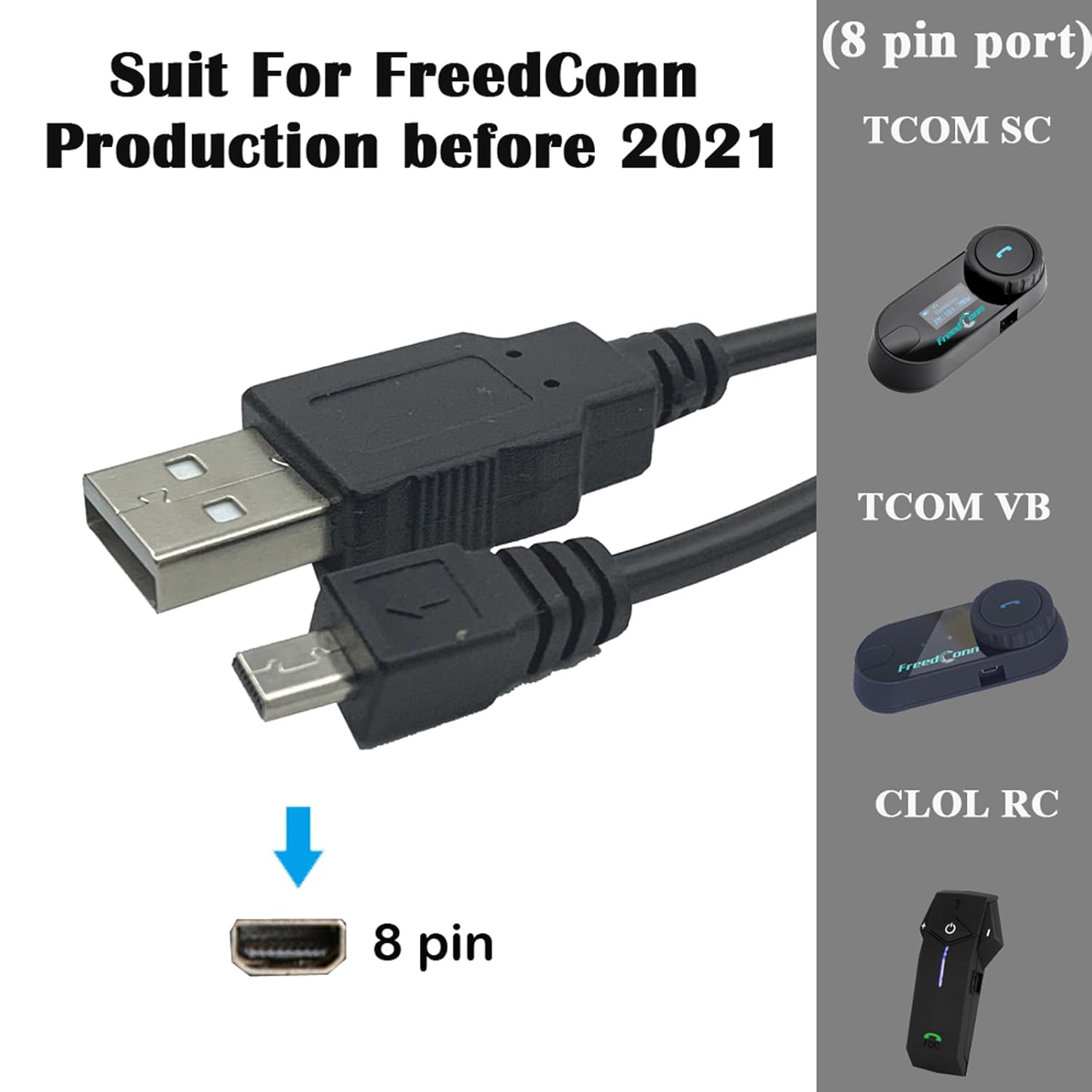
Image: Comparison showing the 'NEW' 5-pin USB charging port (marked with an X) and the 'OLD' 8-pin USB charging port (marked with a checkmark). This cable is compatible only with the 8-pin port.
Please inspect your intercom's charging port carefully to confirm it has an 8-pin configuration before attempting to connect this cable.
Damezirandin
- Identify the Intercom Charging Port: Locate the charging port on your FreedConn TCOM-SC, TCOM-VB, FDC-VB, or COLORC motorcycle intercom. Ensure it is an 8-pin mini USB port.
- Bi Çavkaniya Hêzê ve Giredin: Insert the standard USB-A end of the charging cable into a compatible USB power adapter (e.g., wall charger, computer USB port, power bank).
- Connect to Intercom: Carefully insert the 8-pin mini USB connector into the charging port of your FreedConn intercom. Ensure the connector is oriented correctly and slides in smoothly without force.

Image: The FreedConn 8-pin USB charging cable shown alongside compatible intercom models: TCOM SC, TCOM VB, and CLOL RC, all featuring the 8-pin port.
Operating Instructions (Charging)
Once the cable is properly connected to both a power source and your intercom, the intercom should begin charging. Refer to your specific intercom model's user manual for details on charging indicators (e.g., LED lights changing color or blinking patterns) and estimated charging times.
- Ensure the power source is active and providing sufficient power (typically 5V).
- Avoid interrupting the charging cycle frequently.
- Disconnect the cable once the intercom is fully charged to prolong battery life.
Lênerrînî
- Paqijî: Use a soft, dry cloth to gently wipe the cable and connectors. Avoid using liquid cleaners or abrasive materials.
- Embarkirinî: Store the cable in a cool, dry place away from direct sunlight and extreme temperatures. Avoid tightly coiling or bending the cable sharply, which can damage the internal wires.
- Handling: Always grasp the connector ends when plugging or unplugging the cable. Do not pull on the cable itself, as this can strain the connections and lead to damage.

Image: A detailed display of the cable, highlighting its USB-A connector, 8-pin connector, durable wire, and a neatly coiled cable for storage, demonstrating proper handling and care.
Çareserkirina pirsgirêkan
- Intercom Not Charging:
- Ensure the cable is securely connected to both the power source and the intercom.
- Verify that the power source is functional (e.g., try charging another device with the same adapter).
- Confirm your intercom has an 8-pin charging port. This cable is not compatible with 5-pin ports.
- Biceribînin ku adapterek hêzê ya USB-yê ya cûda bikar bînin.
- Barkirina Hêdî:
- Ensure the power adapter provides adequate current (check the adapter's output specifications).
- Avoid charging in extremely cold or hot environments, as this can affect battery performance.
- Zirara kabloyê: If the cable shows signs of fraying, exposed wires, or bent pins, discontinue use immediately and replace it to prevent potential damage to your intercom or power source.

Wêne: Nêzîkbûn view of the 8-pin mini USB connector, highlighting its specific pin configuration for identification and proper connection.
Specifications
- Tîpa girêdanê: USB 2.0 (Type-A to Mini 8-pin)
- Dirêjahiya kabloyê: Approximately 1 meter (3.2 feet)
- Reng: Reş
- Mal: Flexible, durable cable with gold-plated connectors
- Lihevhatî: FreedConn TCOM-SC, TCOM-VB, FDC-VB, COLORC motorcycle Bluetooth intercoms (versions produced before 2021 with 8-pin charging port)
- Maximum Voltage: 5 Volt (DC)
- Naveroka pakêtê: 1 x FreedConn 8-Pin USB Charging Cable
Agahî Garantî
Specific warranty details for this accessory may vary. Please refer to the original purchase documentation or contact FreedConn customer support directly for information regarding warranty coverage, terms, and conditions.
Piştgiriya Mişterî
For additional assistance, technical support, or inquiries regarding this product, please visit the official FreedConn website or consult the user manual provided with your FreedConn intercom system. Contact information for customer service can typically be found on the manufacturer's website.