
Pêşkêş
This manual provides instructions for the safe and efficient operation of your RIDGID R84086B 18-Volt Cordless Mini Bluetooth Radio. This compact and versatile device offers portable audio entertainment and device charging, featuring AM/FM radio, Bluetooth connectivity, and an auxiliary input. It is powered by RIDGID 18-Volt batteries and can also function as a power bank for charging other devices.
Agahiyên Ewlekariyê
Always read and understand all safety warnings and instructions before operating this product. Failure to follow these instructions may result in electric shock, fire, and/or serious injury.
- Do not expose the radio to rain or wet conditions. Water entering the radio will increase the risk of electric shock.
- Use only with specified battery packs. Using any other battery packs may create a risk of injury and fire.
- Do not operate the radio in explosive atmospheres, such as in the presence of flammable liquids, gases, or dust.
- Keep the radio away from heat sources, direct sunlight, and extreme temperatures.
- Always ensure the battery is properly seated before use.
Product Overview
Familiarize yourself with the components of your RIDGID R84086B radio.
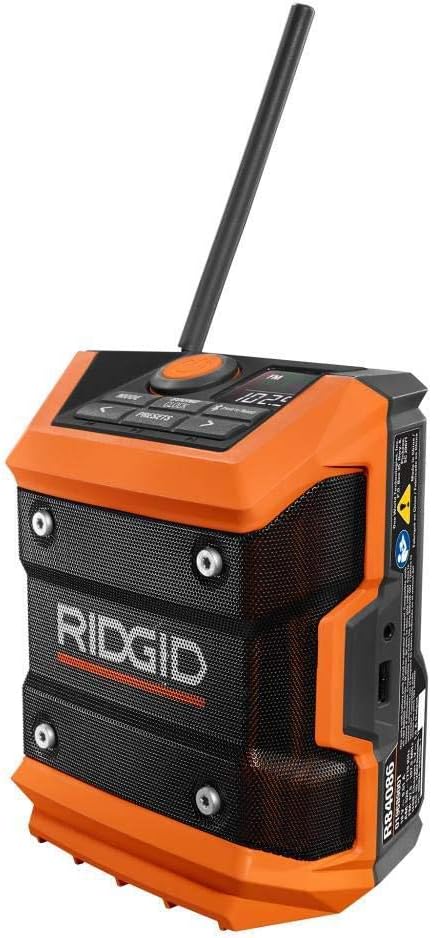
Wêne 1: Pêşî view of the RIDGID R84086B radio, showing the control panel, speaker, and extended antenna.

Figure 2: The RIDGID R84086B radio in a workshop setting, demonstrating its portability and use with a smartphone.
Damezirandin
Sazkirina Pîlê
- Piştrast bike ku radyoyê vemirandî ye.
- Align a charged RIDGID 18-Volt battery pack with the battery port on the radio.
- Pakêta bateriyê heta ku bi ewlehî li cihê xwe bicîh bibe, têxin nav portê.
Guhertina Antenna
For optimal radio reception, extend and adjust the antenna as needed. The antenna can be rotated and tilted to improve signal strength.
Telîmatên Operating
Power On / Off
Press the orange power button located on the control panel to turn the radio on or off.
Hilbijartina Mode
Bitikîne AWA button to cycle through available audio sources: FM Radio, AM Radio, Bluetooth, and Auxiliary (AUX) input.
Radio Tuning (AM/FM)
- Bi karanîna vê bikirtînin moda FM an AM hilbijêrin AWA pişkov.
- Çep bikar bînin (<) û rast (>) arrow buttons to manually tune to a desired frequency.
- Ji bo tomarkirina stasyonekê wekî pêşwext tomar bikin, pêl bikin û bigirin PRESETS button, then use the arrow buttons to select a preset number and press PRESETS dîsa piştrast bikin.
Hevgirtina Bluetooth
- Bi karanîna wê moda Bluetooth-ê hilbijêrin AWA button. The Bluetooth icon on the display will flash, indicating it is in pairing mode.
- Li ser cîhaza xweya desta, Bluetooth-ê çalak bikin û li cîhazên berdest bigerin.
- Select "RIDGID Radio" from the list of devices to pair. Once paired, the Bluetooth icon will stop flashing and remain solid.
Auxiliary Input
To use the auxiliary input, connect an audio device (e.g., smartphone, MP3 player) to the 3.5mm AUX port on the side of the radio using a standard audio cable. Select AUX mode using the AWA pişkov.
Serastkirina Deng
Bitikîne SOUND/CLOCK button to access sound settings. Use the arrow buttons to adjust bass and treble levels for your preferred audio experience.
Fonksiyona Bankeya Hêzê
The radio features a USB port that allows you to charge compatible devices. Connect your device to the USB port using an appropriate charging cable. The radio's battery will provide power to charge your device.
Video: Demonstration of the RIDGID R84086B radio's features, including battery installation, mode selection, radio tuning, auxiliary input, and power bank functionality.
Lênerrînî
Paqijî
Regularly clean the radio with a soft, damp qumaş. Kîmyewiyên dijwar an paqijkerên aşınker bikar neynin. Piştrast bikin ku hemî port ji toz û bermayiyan bêpar in.
Lênêrîna Pîl
Store battery packs in a cool, dry place away from direct sunlight. Do not store battery packs in a discharged condition. Always charge batteries fully before extended storage.
Çareserkirina pirsgirêkan
Hêz tune
- Piştrast bike ku pakêta bataryayê bi tevahî şarj bûye û bi rêkûpêk hatiye danîn.
- Check for any obstructions in the battery port.
Belengaz Resepsiyona Radio
- Extend and adjust the antenna for better signal.
- Move the radio to a different location to avoid interference.
Pirsgirêkên Têkiliya Bluetooth
- Ensure the radio is in Bluetooth pairing mode.
- Piştrast bike ku Bluetooth-a cîhaza te ya mobîl çalak e û di nav rêza wê de ye.
- Biceribînin ku cîhazê ji hev veqetînin û ji nû ve hevber bikin.
Specifications
| Nîşan | RIDGID |
| Hejmara Model | R84086B |
| Teknolojiya Girêdanê | Bluetooth |
| Çavkaniya Hêzê | Battery Powered (RIDGID 18-Volt) |
| Babetê Weight | 1.75 Pound |
| Amûrên Lihevhatî | Smartphone |
| Navrûya Alavê | USB |
| UPC | 723548648427 |
Garantî û Piştgirî
Agahî Garantî
This product comes with a 90-day limited warranty. Please refer to the warranty card included with your purchase for full terms and conditions.
Piştgiriya Mişterî
For technical assistance, troubleshooting, or warranty claims, please contact RIDGID customer support. Contact information can typically be found on the official RIDGID webmalper an li ser pakkirina hilberê we.