
Pêşkêş
This manual provides essential information for the proper use and maintenance of your Easytry123 replacement infrared remote control. This remote is designed to be compatible with specific Philips LED HDTV TV models, including 49PUS6501/12, 49PUS6551/12, 49PUS6561/12, 49PUS7101/12, 49PUS7181/12, 49PUT6801/98, and 55PUS6501/12. Please verify your TV model number to ensure compatibility.
Important Note: This is a replacement remote control and may not support all functions of your original TV remote. It is not a universal remote control.
Product Overview

Wêne 1: Pêşde view of the Easytry123 replacement remote control, showing the power button, navigation pad, channel/volume controls, and numeric keypad.
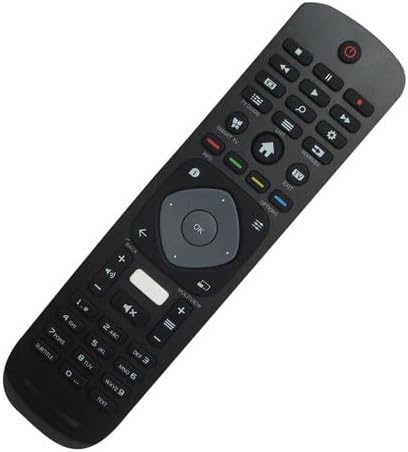
Wêne 2: Pêşiya goşeyî view ya dûrveyê, ku sêwirana wê ya ergonomîk û sêwirana bişkokan nîşan dide.

Wêne 3: Paş view ya kontrola dûr, ku qapaxa beşa pîlê nîşan dide.
The Easytry123 replacement remote control features a standard button layout for TV operation, including power, channel, volume, navigation, and numeric input. It is designed for comfortable handling and intuitive use.
Damezirandin
1. Sazkirina Pîl
- Cihê beşa pîlê li ser pişta kontrolê ji dûr ve.
- Ji bo vekirina qapaxa beşa bateriyê ber bi jêr an jî ber bi derve ve bihejînin.
- Du (2) pîlên AAA têxin hundir, piştrast bikin ku termînalên erênî (+) û neyînî (-) bi nexşeyên di hundirê beşê de li hev dikin.
- Qapaxa beşa pîlê bi ewlehî bigire.
No setup or coding is required for this remote control. Once batteries are installed, it is ready for use with compatible Philips TV models.
Telîmatên Operating
This remote control operates using infrared (IR) technology. Ensure there is a clear line of sight between the remote control and the IR receiver on your television for optimal performance.
- Bişkojka Hêzê: Ji bo vekirina an vemirandina TV-yê pêl bike.
- Klavyeya hejmarî (0-9): Ji bo rasterast têketina hejmarên kanalê bikar bînin.
- Kanal Jor/Jêr: Press to change channels sequentially.
- Volume Zêde/Kêmkirin: Press to adjust the sound volume.
- Bişkojka Bêdeng: Press to mute or unmute the TV sound.
- Navigation Pad (Arrow Buttons & OK): Ji bo gerandina di menuyan de û piştrastkirina hilbijartinan bikar bînin.
- Bişkokên Paşve/Derketinê: Used to return to the previous screen or exit menus.
- Smart TV/Home Button: Accesses the TV's smart features or home screen.
Functionality may vary depending on your specific TV model. Some advanced features or specific buttons present on your original remote may not be replicated on this replacement unit.
Lênerrînî
Guhertina Pîl
Dema ku bersiva dûrkontrolê sist bibe an jî kar raweste, pîlan biguherînin. Her tim her du pîlan di heman demê de bi pîlên AAA yên nû biguherînin. Pîlên kevin û nû, an jî celebên cûda yên pîlan tevlihev nekin.
Paqijî
Ji bo paqijkirina dûrdesteyê, qumaşek nerm û hişk bikar bînin. Ji bo qirêjiya serhişk, hinekî hişk bikin.ampqumaşê bi avê bişon. Ji bikaranîna kîmyewiyên dijwar, paqijkerên aşınker, an jî şilbûna zêde dûr bisekinin, ji ber ku ev dikarin zirarê bidin dûrvegerê.
Çareserkirina pirsgirêkan
- Dûr bersiv nade:
- Kontrol bike ka batarya bi awayekî rast û bi polarîteya rast hatine danîn an na.
- Pîlên kevin bi pîlên AAA yên nû biguherînin.
- Piştrast bike ku di navbera dûrdestê û wergirê IR yê TV-yê de ti astengî tune ye.
- Confirm that the remote is pointed directly at the TV.
- Hin fonksiyon kar nakin:
- As a replacement remote, it may not support all functions of the original TV remote. This is normal for some replacement units.
- Piştrast bike ku modela televîzyona te wekî hevaheng tê navnîş kirin.
- Rêjeya xebatê ya kurt:
- Pîl biguherînin.
- Ensure no strong light sources (like direct sunlight) are interfering with the IR signal.
Specifications
| Nîşan | Easytry123 |
| Hejmara Model | Easytry5633 |
| Amûrên Lihevhatî | Television (Specific Philips LED HDTV models) |
| Teknolojiya Girêdanê | Infrared (IR) |
| Type Controller | Button Control |
| Rêzeya herî zêde | 10 Metre (nêzîkî 33 ling) |
| Batteries Required | 2 x bataryayên AAA (ne tê de) |
| Taybetmendiya Taybet | Replacement item; may not work with all original functions. Not a universal remote. |
Garantî û Piştgirî
Agahî Garantî
This Easytry123 remote control comes with a 90-day warranty from the date of purchase. This warranty covers manufacturing defects under normal use. It does not cover damage caused by misuse, accidents, unauthorized modifications, or battery leakage.
Piştgiriya Mişterî
For any questions, issues, or warranty claims regarding your Easytry123 remote control, please contact the seller or manufacturer directly through your purchase platform. Provide your order number and a detailed description of the issue for prompt assistance.