
Easytry123 Easytry2094
Easytry123 Replacement Remote Control User Manual
For Samsung HW-J450/ZA, PS-WJ651, PS-WJ470/ZA, HW-J6502, HW-J650 Audio Soundbar Systems
1. Destpêk
This manual provides instructions for the Easytry123 replacement remote control, designed for use with various Samsung audio soundbar systems. This remote control offers basic functionality for compatible models. Please note that as a replacement unit, it may not support all advanced functions of the original remote control.
Modelên Lihevhatî:
- Samsung HW-J450/ZA
- Samsung PS-WJ651
- Samsung PS-WJ651/ZA
- Samsung PS-WJ470/ZA
- Samsung HW-J6502
- Samsung HW-J650
2. Sazkirin
2.1 Sazkirina Pîl
The remote control requires batteries for operation. Batteries are not included with the remote control and must be purchased separately. This remote typically uses standard Lithium batteries.
- Cihê beşa pîlê li ser pişta kontrolê ji dûr ve.
- Remove the battery compartment cover by sliding or gently prying it open.
- Insert the new batteries, ensuring the correct polarity (+ and -) as indicated inside the compartment.
- Qapaxa beşa bateriyê heta ku bi ewlehî li cihê xwe bicîh bibe, vegerînin cihê xwe.

Figure 1: Remote control with battery compartment open.
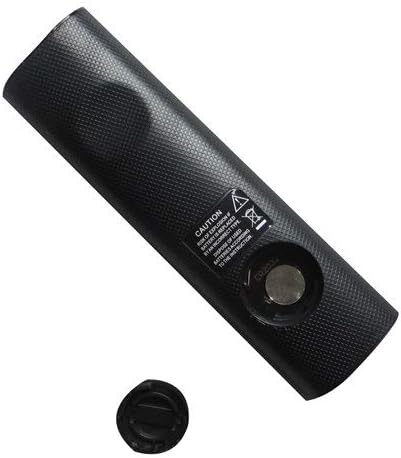
Figure 2: Remote control showing the battery cap detached.
2.2 Bikaranîna Destpêk
This remote control utilizes infrared (IR) technology. No complex pairing or programming is typically required. Once batteries are installed, point the remote directly at your Samsung soundbar system and begin operation.
3. Telîmatên Operating
The remote control features 15 buttons for various functions. While specific button labels may vary, common functions include:
- Erk: Turns the soundbar system on or off.
- Volume Zêde/Kêmkirin: Asta derketina deng eyar dike.
- Bêdeng: Derana deng bêdeng dike.
- Ketin/Çavkanî: Çavkaniyên têketina deng ên berdest (mînak, HDMI, Optîkî, Bluetooth) diguhere.
- Bişkokên Navîgasyonê: Used for menu navigation (if supported by the soundbar and remote).
- Kontrolên Playback: Play, Pause, Skip (if controlling a connected media device).
For optimal performance, ensure a clear line of sight between the remote control and the soundbar's IR receiver. The maximum effective range is approximately 10 meters (33 feet).
4. Maintenance
4.1 Guhertina Pîl
Replace batteries when the remote control's response becomes inconsistent or stops working. Always replace all batteries at the same time with new ones of the same type. Do not mix old and new batteries, or different types of batteries.
4.2 Paqijkirin
Ji bo paqijkirina dûrkontrolê, bi qumaşek nerm û hişk paqij bikin. Paqijkerên şil, peçên aşınker, an çareserkerên kîmyewî bikar neynin, ji ber ku ev dikarin zirarê bidin rûyê dûrkontrolê an jî pêkhateyên hundirîn.
4.3 Storage
Kontrola dûr li cîhekî sar, hişk û dûr ji tîrêjên rojê û germahiyên zêde hilînin. Ger kontrol dê demek dirêj neyê bikar anîn, ji bo rêgirtina li rijandinê tê pêşniyar kirin ku pîlan werin derxistin.
5. Destpêkirin
- Dûr bersiv nade:
- Kontrol bikin ka bataryayên bi polarîteya rast bi rêkûpêk hatine danîn.
- Li şûna bataryayên bi yên teze.
- Ensure there is a clear line of sight between the remote and the soundbar's IR receiver. Remove any obstructions.
- Piştrast be ku tu di nav rêza xebitandinê ya bi bandor de yî (nêzîkî 10 metreyan).
- Hin fonksiyon kar nakin:
- As a replacement remote, it may not support all advanced or specific functions of the original equipment. This is normal for universal or replacement remotes.
- Verify that your soundbar model is listed as compatible in the Introduction section.
6. Specifications
| Taybetî | Specification |
|---|---|
| Nîşan | Easytry123 |
| Navê Model | Easytry2094 |
| Teknolojiya Girêdanê | Infrared (IR) |
| Hejmara Bişkokan | 15 |
| Type Controller | Button Control |
| Rêzeya herî zêde | 10 Metre |
| Cureyê Pîl | Lîtyûm (ne tê de ye) |
| Reng | Reş |
| Amûrên Lihevhatî | Samsung Audio Soundbar Systems (specific models listed) |
7. Garantî û Piştgirî
For warranty information and customer support, please refer to the seller or retailer from whom you purchased this product. Specific warranty terms and support channels are typically provided at the point of sale.
Ask a question about this manual
Ask about setup, troubleshooting, compatibility, parts, safety, or missing instructions. Manuals+ will review the question and use this page’s manual context to help answer it.