
1. Destpêk
This manual provides instructions for the safe and efficient operation of your RCF MS1033 Home CD Player. The MS1033 is a dual sound source unit, featuring two independent sections for simultaneous use. It includes a CD player with anti-shock mechanics and electronics, capable of playing audio tracks and MP3 files from CD, CD-R, and CD-R/W discs. Additionally, it features an MP3 player that supports USB flash drives and Secure Digital (SD) cards, including Multimedia Cards.
Ji kerema xwe berî bikaranîna amûrê vê rêbernameyê bi baldarî bixwînin û ji bo referansa pêşerojê biparêzin.
2. Telîmatên Ewlekariya Girîng
- Vê amûrê nexin ber baran û nemê.
- Tu vebûnên hewayê asteng nekin.
- Li nêzî ti çavkaniyên germê yên wekî radyator, tomarên germê, sobe, an amûrên din saz nekin (di nav de ampgiyandar) ku germê çêdikin.
- Kabloya elektrîkê ji rêveçûn an pêçandinê biparêzin.
- Tenê pêvedan / pêlavên ku ji hêla çêker ve hatine destnîşan kirin bikar bînin.
- Di dema bahoza birûskê de an jî dema ku ji bo demên dirêj nayên bikar anîn vê amûrê ji fîşê vekin.
- Hemî karûbarê ji personelên karûbarê pispor re bişînin.
3. Naveroka pakêtê
Piştrast bike ku hemî tişt di pakêtê de hene:
- RCF MS1033 Home CD Player
- Cable Power
- Manual Bikarhêner (ev belge)
Note: The product specifications mention "Included components: cd/mps". This refers to the player unit itself and essential accessories.
4. Kontrol û Taybetmendî
Familiarize yourself with the various controls and features of your RCF MS1033.
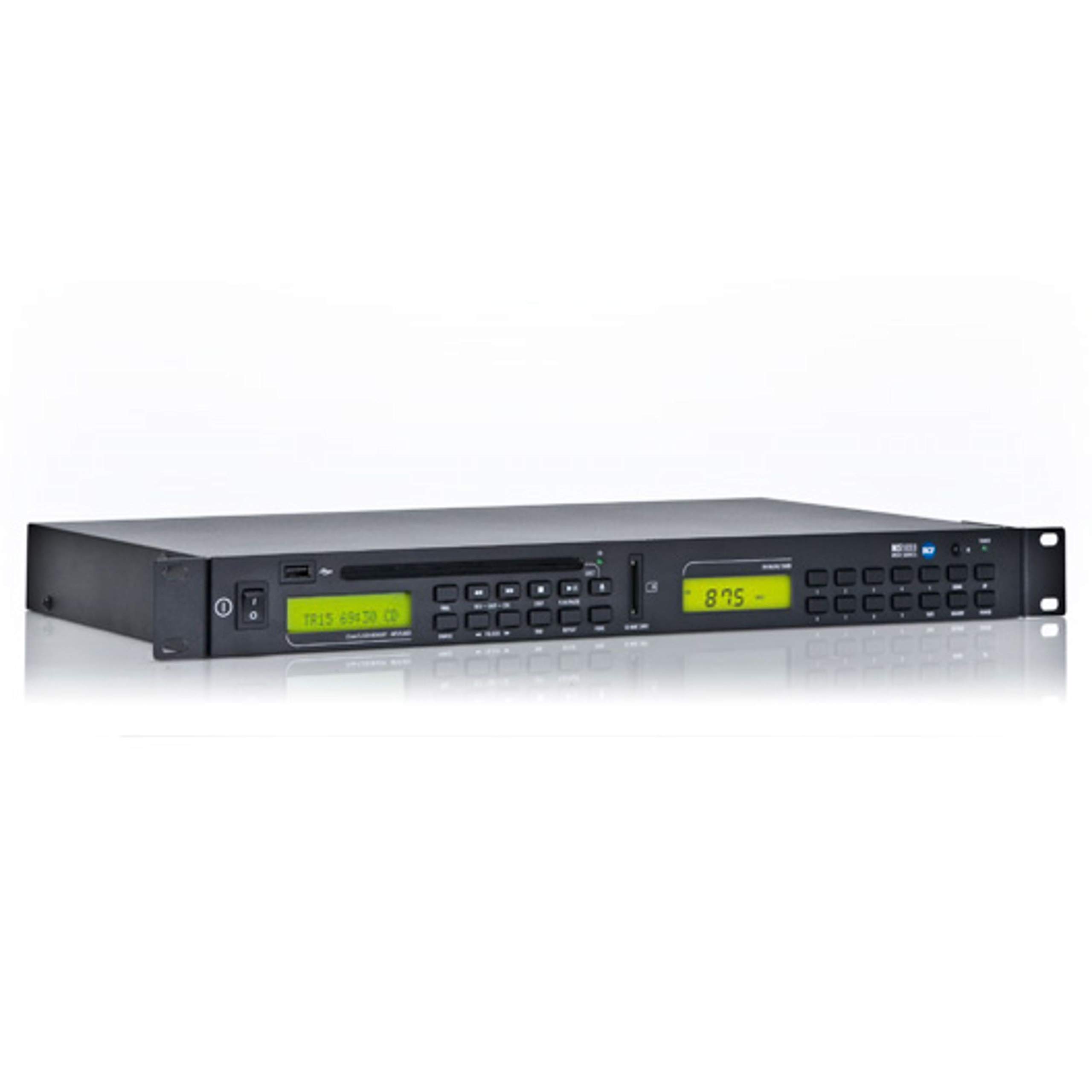
Figure 1: Front panel of the RCF MS1033 Home CD Player. This image displays the main unit with its CD tray, digital display, and various control buttons for playback and source selection.
4.1 Panela Pêşîn
- Tray CD: For inserting audio CDs, CD-R, and CD-R/W discs.
- Ekrana Nîşandanê: Shows track information, playback status, and source selection.
- Porta USB: For connecting USB flash drives to play MP3 files.
- Slota qerta SD: For inserting SD/MMC cards to play MP3 files.
- Bişkokên Kontrolê: Play/Pause, Stop, Skip Forward/Backward, Folder Navigation, Source Select.
4.2 Panela paşîn
- Derketina Deng (RCA): Bi an ve girêdide amplifier an wergirê.
- Ketina Hêzê: Bi dabînkirina hêza AC ve girêdayî ye.
5. Sazkirin
5.1 Vekirin
Carefully remove the unit from its packaging. Retain the packaging materials for future transport or storage.
5.2 Cihkirin
Place the RCF MS1033 on a stable, flat surface. Ensure adequate ventilation around the unit. Avoid placing it near heat sources or in direct sunlight.
5.3 Girêdana bi Power
- Ensure the unit's power switch (if present) is in the OFF position.
- Connect the power cable to the power input on the rear of the MS1033.
- Serê din ê kabloya elektrîkê bi prizek elektrîkê ya AC ya guncaw ve girêdin.
5.4 Girêdana bi Sîstemeke Dengî re
- Locate the RCA audio output jacks on the rear of the MS1033.
- Connect an RCA audio cable (not included) from these outputs to an available audio input on your amplifier or receiver (e.g., "CD IN", "AUX IN").
- Ensure the connections are secure and correctly matched (red to red, white to white).
6. Telîmatên Operating
6.1 Hêzdarkirin/Off
Press the Power button on the front panel or remote control (if included) to turn the unit ON or OFF.
6.2 Playback CD
- Press the "CD" source button (if available) or ensure the unit is in CD mode.
- Press the "Eject" button to open the CD tray.
- Place a CD (audio CD, CD-R, CD-R/W with audio or MP3 files) onto the tray with the label side facing up.
- Press the "Eject" button again or gently push the tray to close it.
- The unit will read the disc. Playback should start automatically or by pressing the "Play" button.
- Use "Play/Pause", "Stop", and "Skip" buttons to control playback.
6.3 Lîstin bi Karta USB/SD
- Insert a USB flash drive into the USB port or an SD/MMC card into the SD card slot.
- Press the "USB/SD" source button (if available) or ensure the unit is in USB/SD mode.
- The unit will scan the device for MP3 files.
- Use the navigation buttons to browse folders and select tracks.
- Press "Play" to start playback.
6.4 Dual Sound Source Operation
The RCF MS1033 features two independent sections. This allows for simultaneous playback from different sources if your amplifier or mixer has multiple inputs. Consult your amplifier's manual for connecting and managing multiple audio inputs.
7. Maintenance
7.1 Paqijkirin
Disconnect the power cord before cleaning. Use a soft, dry cloth to clean the exterior of the unit. Do not use liquid cleaners or aerosol cleaners.
7.2 Handling Disc
- Her tim dîskan ji qiraxên wan bigirin.
- Dîskan paqij û bê xêzik bihêlin.
- Dema ku neyên bikar anîn dîskên xwe di rewşên wan de hilînin.
7.3 USB/SD Card Care
- Always safely remove USB drives and SD cards from the unit when not in use or before powering off.
- Avoid exposing storage devices to extreme temperatures or moisture.
8. Destpêkirin
| Pirsegirêk | Sedema gengaz | Çare |
|---|---|---|
| Hêz tune | Kabloya elektrîkê ne girêdayî ye; Priza elektrîkê ne çalak e | Check power cord connection; Test power outlet with another device |
| Deng tune | Audio cables not connected; Incorrect input selected on amplifier; Amplifier volume too low | Check audio cable connections; Select correct input on amplifier; Increase ampvolume lifier |
| Dîsk nayê lîstin | Disc inserted incorrectly; Disc is dirty or scratched; Disc format not supported | Reinsert disc correctly; Clean or replace disc; Ensure disc is CD, CD-R, CD-R/W with audio or MP3 files |
| USB/SD nalîze | Device not inserted correctly; Files are not MP3 format; Device not recognized | Reinsert USB/SD; Ensure files are MP3; Try a different USB/SD device |
9. Specifications
| Taybetî | Hûrî |
|---|---|
| Cins | MS1033 |
| Nîşan | RCF |
| Mezinahiya Hilberê | 6 x 8 x 7 inches |
| Babetê Weight | 8 lîre |
| Teknolojiya Girêdanê | USB |
| Taybetmendiya Taybet | CD-R/RW Compatible |
| Formatên Dîskê piştgirî kirin | CD, CD-R, CD-R/W (Audio tracks and MP3 files) |
| Medyaya Dîjîtal a Piştgirîkirî | USB Flash Drives, SD Cards, Multimedia Cards (MP3 files tenê) |
10. Garantî û Piştgirî
For warranty information and technical support, please refer to the official RCF website or contact your local RCF dealer. Keep your purchase receipt as proof of purchase.
Têbînî: Mercên garantiya taybetî dikarin li gorî herêm û firoşkar cûda bibin.