
Pêşkêş
This manual provides instructions for the installation, operation, and maintenance of your Audiovox ELEAUDAX80EXT Wireless Extension. This device is designed to expand the functionality of compatible Audiovox phone models, specifically the AX8001, AX8001E, and AX8101AM, by providing an additional wireless handset.
Naveroka pakêtê
Please verify that all items are present in the package before proceeding with the setup.
- Audiovox ELEAUDAX80EXT Wireless Extension Unit
- Adaptera Hêzê (heke hebe)
- Rechargeable Battery (pre-installed or separate)
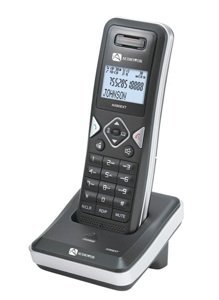
Image: The Audiovox ELEAUDAX80EXT Wireless Extension Unit. This image displays the compact design of the extension handset.
Damezirandin
- Battery şarj bikin: If the battery is not pre-installed, insert it into the extension unit according to the markings. Place the extension unit on its charging cradle (if included) or connect the power adapter directly to the unit and a power outlet. Allow the unit to charge for at least 12-16 hours before initial use.
- Register the Extension:
- Ensure your main Audiovox phone base (AX8001, AX8001E, or AX8101AM) is powered on.
- On the main phone base, locate and press the "Register" or "Page" button. Hold it until the indicator light on the base begins to flash (refer to your main phone's manual for exact instructions).
- While the base is in registration mode, on the ELEAUDAX80EXT extension unit, navigate to the "Menu" and select "Register Handset" or a similar option. Follow the on-screen prompts.
- Once registration is successful, the extension unit will display a confirmation message, and the indicator light on the base will stop flashing.
- Têkiliya Testê: Make a test call from the extension unit to ensure proper functionality.
Telîmatên Operating
Making A Call
- Destê xwe hildin an pêl pê bikin AXAFTIN pişkov.
- Hejmara têlefonê ya xwestî bizivirîne.
- Bitikîne AXAFTIN button again or place the handset back on the cradle to end the call.
Bersiva Bangek
- Dema ku telefon lê da, destavê rake an jî bişkojka (bişkojka) AXAFTIN pişkov.
- Ji bo dawîkirina bangê, pêl pê bikin DAWÎ button or place the handset back on the cradle.
Intercom Function (if supported by base unit)
- Bitikîne ALTA AXAFTINÊ pişkov.
- Dial the number of the extension you wish to call (e.g., "2" for the second handset).
- Rojnamevanî AXAFTIN to initiate the intercom call.
Lênerrînî
- Paqijî: Yekîneya bi nermî paqij bike, damp çît. Kîmyewî û paqijkerên hişk bikar neynin.
- Lênêrîna Pîl: For optimal battery life, avoid fully discharging the battery frequently. Keep the unit on its charger when not in use.
- Embarkirinî: If storing the unit for an extended period, remove the battery and store it in a cool, dry place.
Çareserkirina pirsgirêkan
| Pirsegirêk | Çare |
|---|---|
| Dengê telefonê tune / Bang nayê kirin |
|
| Telefon nayê şarjkirin |
|
| Kalîteya bangê nebaş / Statîk |
|
Specifications
- Hejmara Model: ELEAUDAX80EXT
- Yekîneyên bingehîn ên lihevhatî: Audiovox AX8001, AX8001E, AX8101AM
- Pîvan (L x W x H): 20 x 40 x 30 milimeter
- Pîvan: 20 gram
- UPC: 044476082719
Garantî û Piştgirî
For specific warranty information and technical support, please refer to the documentation included with your original Audiovox phone system or visit the official Audiovox webmalper. Rapora kirîna xwe wekî delîla kirînê ji bo îdîayên garantiyê biparêzin.
For further assistance, please contact Audiovox customer service.