
1. Destpêk
This manual provides comprehensive instructions for the installation, operation, and maintenance of your BlueBird A1390 Automatic Irrigation Tap Programmer. This device is designed to automate your garden watering schedule, ensuring efficient and consistent irrigation. Please read this manual thoroughly before using the product to ensure correct operation and to prevent damage.
2. Agahiyên Ewlekariyê
- Do not immerse the unit in water. The unit is designed to be weather-resistant, but not submersible.
- Tenê pîlên alkalîn ên 1.5V AA bikar bînin. Pîlên kevin û nû, an jî celebên cûda yên pîlan tevlihev nekin.
- Ger amûr demek dirêj neyê bikaranîn, pîlan derxînin da ku rê li ber rijandinê were girtin.
- Dûr negihêjin zarokan.
- Hewl nedin ku cîhazê bi xwe ji hev veqetînin an tamîr bikin. Ji bo xizmetê bi karmendên pispor re têkilî daynin.
- Ji bo rêgirtina li rijandinê, piştrast bikin ku hemî girêdan bi ewlehî ne.
3. Naveroka pakêtê
Ji kerema xwe pakêtê ji bo tiştên jêrîn kontrol bikin:
- 1x BlueBird A1390 Automatic Irrigation Tap Programmer
- 1x Rêbernameya Bikarhêner (ev belge)
Note: 2 AA 1.5V batteries are required for operation and are not included in the package.
4. Hilbera Serîview
The BlueBird A1390 features two main rotary dials for setting irrigation frequency and duration, along with a battery indicator and an ON/OFF switch.
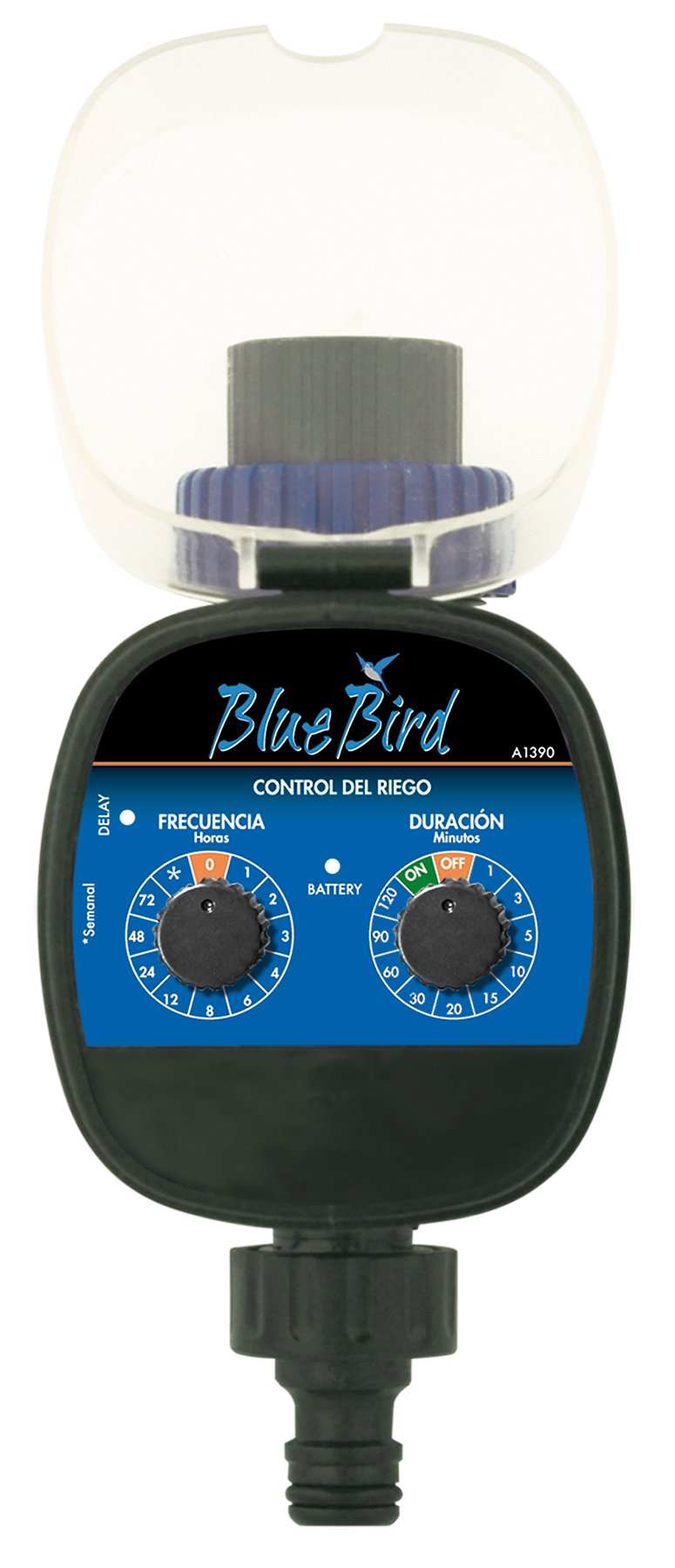
jimar 1: Pêşde view of the BlueBird A1390 Irrigation Programmer. The left dial controls irrigation frequency, and the right dial controls irrigation duration. A battery indicator light is located between the dials.
Pêkhat:
- Frequency Dial (Frecuencia): Sets how often the irrigation occurs. Options include 0 (off), 1, 2, 3, 4, 6, 8, 12, 24, 48, 72 hours, and a '*' setting for manual or weekly operation.
- Duration Dial (Duración): Sets how long each irrigation cycle lasts. Options include 0 (off), 1, 3, 5, 10, 15, 20, 30, 60, 90, 120 minutes.
- Veguheztina ON/OFF: Located on the Duration Dial, allows for manual override or turning the unit off.
- Nîşana Pîlê: A light that indicates battery status.
- Parçeya pîlê: Located at the rear of the unit (not visible in Figure 1).
- Derketin/Ketina Avê: Standard tap and hose connections.
5. Sazkirin
5.1 Sazkirina Pîl
- Qapaxa beşa bateriyê li pişta cîhazê bibîne.
- Remove the cover by twisting or sliding it open.
- Du (2) bataryayên alkalîn ên 1.5V AA yên nû têxin hundir, û polarîteya rast (+/-) bicîh bikin.
- Qapaxa beşa bateriyê bi ewlehî vegerînin da ku berxwedana avê were parastin.
5.2 Connecting to the Tap
- Ensure your outdoor tap is turned off.
- Screw the BlueBird A1390 programmer onto your tap. Hand-tighten only to prevent damage.
- Connect your garden hose or irrigation system to the outlet of the programmer. Ensure a tight connection to prevent leaks.
- Slowly turn on your outdoor tap. Check for any leaks at the connections.
6. Telîmatên Operating
The BlueBird A1390 is designed for simple, intuitive programming using its two rotary dials.
6.1 Setting Irrigation Frequency
- Bizivirîne Frequency Dial (left dial) to your desired irrigation interval.
- Mîhengên berdest ev in:
- 0: No irrigation (off).
- 1, 2, 3, 4, 6, 8, 12, 24, 48, 72: Irrigation every X hours.
- *: This setting typically indicates a manual mode or a weekly cycle, depending on the specific model's internal logic. Refer to the example below for common usage.
6.2 Setting Irrigation Duration
- Bizivirîne Duration Dial (right dial) to your desired watering time per cycle.
- Mîhengên berdest ev in:
- JI: No irrigation.
- LI: Continuous irrigation (use with caution).
- 1, 3, 5, 10, 15, 20, 30, 60, 90, 120: Irrigation for X minutes.
6.3 Mînakample Programming
To water every 6 hours for 10 minutes:
- Set bike Frequency Dial ber 6 (saetan).
- Set bike Duration Dial ber 10 (minutes).
The programmer will automatically begin the cycle based on these settings. The first cycle will typically start shortly after programming, or after a short delay.
6.4 Manual ON/OFF
To manually turn on the water, rotate the Duration Dial to the ON position. To stop manual watering, rotate the dial back to JI or a timed setting.
7. Maintenance
7.1 Guhertina Pîl
When the battery indicator light dims or the unit stops functioning, it's time to replace the batteries. Follow the steps in Section 5.1 for battery installation.
7.2 Paqijkirin
Clean the exterior of the programmer with a damp cloth. Do not use abrasive cleaners or solvents. Ensure no water enters the battery compartment or internal electronics.
7.3 Storage Winter
Before the first frost, disconnect the programmer from the tap and hose. Remove the batteries. Store the unit indoors in a dry, frost-free location to prevent damage from freezing water.
8. Destpêkirin
| Pirsegirêk | Sedema gengaz | Çare |
|---|---|---|
| Unit does not turn on/display. | Pîlên mirî an jî bi şaşî hatine sazkirin. | Pîlan biguherînin, û piştrast bikin ku polarîteya wan rast e. |
| Av naherike. | Tap is off; programmer set to '0' or 'OFF'; low water pressure; clogged filter. | Ensure tap is fully open. Check frequency/duration settings. Verify water pressure. Clean any filters. |
| Unit leaks at connections. | Loose connections; missing or damaged washer. | Tighten connections. Check and replace washers if necessary. |
| Irrigation schedule is incorrect. | Incorrect frequency or duration settings. | Re-check and adjust the Frequency and Duration Dials according to your desired schedule. |
9. Specifications
- Cins: A1390
- Nîşan: bluebird
- Çêker: Altadex
- Çavkaniya hêzê: 2 x Pîlên Alkalîn ên AA 1.5V (ne tê de ne)
- Frekansa Avdanê: 0, 1, 2, 3, 4, 6, 8, 12, 24, 48, 72 hours, or '*' (manual/weekly)
- Demjimêra Avdanê: OFF, ON, 1, 3, 5, 10, 15, 20, 30, 60, 90, 120 minutes
- Mezinahiyên hilberê: Nêzîkî 19.4 x 10.6 x 10 cm
- Giraniya hilberê: Nêzîkî 280 g
- GTIN (UPC): 8426375113909
10. Garantî û Piştgirî
This product is covered by a standard manufacturer's warranty. For specific warranty details, please refer to the documentation provided at the time of purchase or contact your retailer. For technical support or inquiries, please contact the seller or manufacturer directly.


