
Pêşkêş
This manual provides detailed instructions for the setup, operation, maintenance, and troubleshooting of your Dual DT 450 manual turntable. Designed for optimal audio quality, this belt-driven turntable features a high-quality wooden housing, a balanced tonearm with adjustable tracking force, and an integrated switchable phono pre-amplifier. Please read these instructions carefully before using your turntable to ensure proper function and longevity.
Product Overview
The Dual DT 450 turntable is engineered to deliver an exceptional vinyl listening experience. Its robust construction and thoughtful features ensure stable playback and clear sound reproduction.
Taybetmendiyên sereke:
- Mînakkirin: High-quality wooden housing for stable operation and a puristic aesthetic.
- Flexibility: Connects to traditional HiFi systems via phono or AUX input; supports two speeds (33/45 RPM).
- pêş-ampzindîtir: Built-in switchable phono pre-amplifier for easy connection.
- Magnetic Pickup System: Features an Audio Technica AT 3600 cartridge with pre-set tracking force and a damped tonearm lift.
- Amûrên Tê de: Turntable unit, platter with drive belt, counterweight, platter mat, dust cover, center puck, and user manual.
Mal Views:
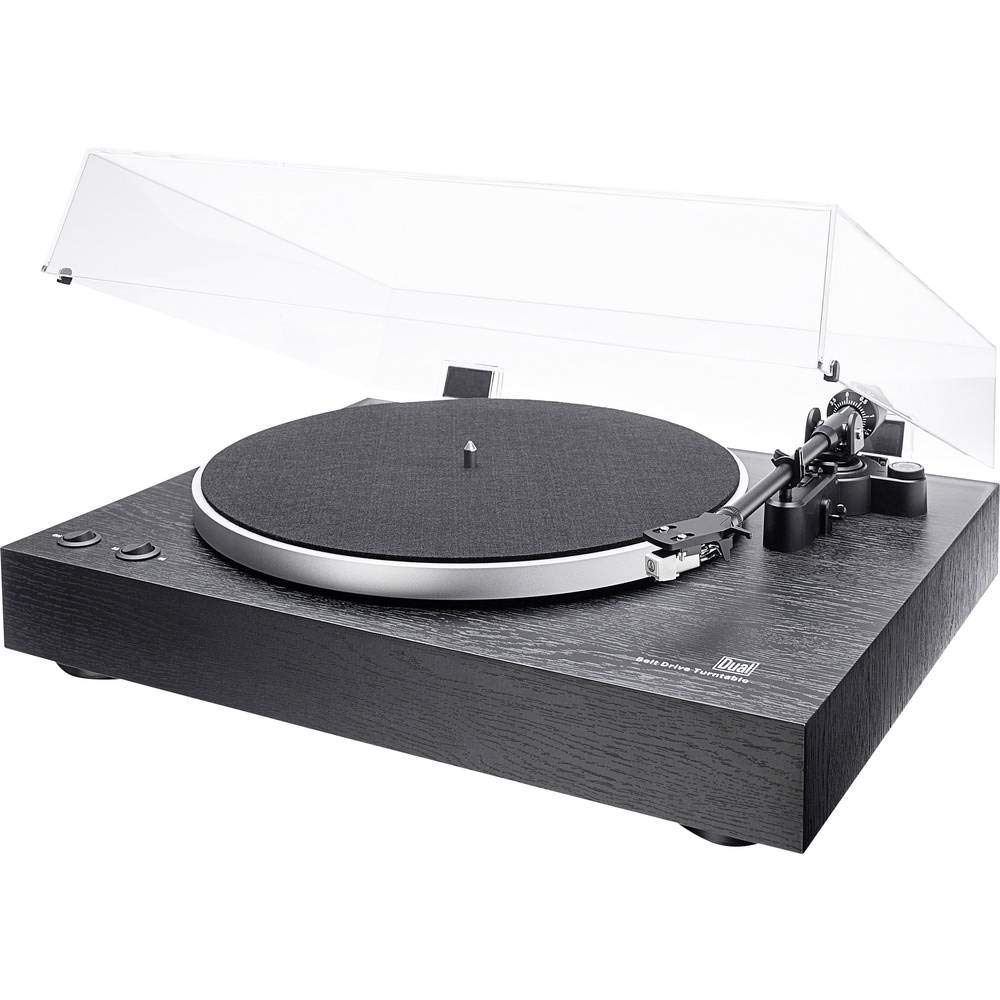
Bi tevayî view of the Dual DT 450 Turntable with its dust cover.

Bi berfirehî view of the Audio Technica AT 3600 magnetic pickup system on the tonearm.

The Dual DT 450 Turntable with its transparent dust cover in the open position.

The Dual DT 450 Turntable with its transparent dust cover in the closed position, protecting the platter and tonearm.
Setup Guide
Follow these steps to correctly set up your Dual DT 450 turntable.
- Vekirin: Carefully remove all components from the packaging. Ensure all accessories listed in the product overview hene.
- Cihkirin: Plakê li ser rûyekî sabît û dûr ji tîrêjên rojê yên rasterast, çavkaniyên germê û lerizînên bihêz deynin.
- Platter and Belt Installation: Place the platter onto the spindle. Carefully install the drive belt around the inner rim of the platter and around the motor pulley.
- Counterweight Installation: Slide the counterweight onto the rear of the tonearm. Rotate it until the tonearm is balanced and floats freely. Then, adjust the counterweight to the recommended tracking force (refer to cartridge specifications, typically around 2-3 grams for the AT3600).
- Rêzkirina Dij-Skating: Set the anti-skating dial to match the tracking force you set. This helps prevent the stylus from skipping across the record.
- Sazkirina Qapaxa Tozê: Attach the dust cover hinges to the rear of the turntable unit.
- Têkiliya Hêzê: Connect the power adapter to the DC input on the rear of the turntable, then plug it into a wall outlet.
- Girêdana Deng: Connect the RCA cables from the turntable to your amplifier or receiver. Use the PHONO input if your amplifier has one and switch the turntable's internal pre-amplifier to 'OFF'. If your amplifier only has AUX/LINE inputs, switch the turntable's internal pre-amplifier to 'ON' and connect to an available AUX/LINE input. Ensure the ground wire is connected to your amptermînala erdê ya lifier, heke hebe.
Vîdyoya Xwenîşandanê ya Sazkirinê:
This video demonstrates the general setup and operation of a turntable. While it may feature a different model, the basic principles of assembly and connection are applicable to the Dual DT 450.
Telîmatên Operating
Once your Dual DT 450 is set up, follow these steps to play your vinyl records.
- Hêzdarkirin: Turn the power switch to the 'ON' position. The platter will begin to rotate.
- Qeyda Cihê: Carefully place your vinyl record onto the platter. If playing a 45 RPM single, use the included center puck.
- Leza Hilbijêre: Choose the correct playback speed (33 or 45 RPM) using the speed selector switch.
- Tonearm hilde: Ji bo bilindkirina tonearm levera hilgirtina tonearm bikar bînin.
- Cihê Tonearm: Gently move the tonearm over the desired starting groove of the record.
- Tonearmê Jêrîn: Slowly lower the tonearm using the tonearm lift lever. The stylus will descend onto the record, and playback will begin.
- Volume eyar bikin: Adjust the volume on your connected amplifier or receiver to your desired listening level.
- Rawestandina Playback: At the end of the record, or when you wish to stop, use the tonearm lift lever to raise the tonearm, then return it to its rest. Turn the power switch to 'OFF'.
Lênerrînî
Regular maintenance ensures optimal performance and extends the life of your turntable.
- Qada tozê: Clean the dust cover with a soft, dry cloth. Avoid abrasive cleaners that may scratch the surface.
- Lênêrîna Stylus: Gently clean the stylus regularly using a soft brush designed for stylus cleaning, brushing from back to front. A dirty stylus can degrade sound quality and damage records.
- Paqijkirina Tomarê: Keep your records clean to prevent dust and debris from accumulating on the stylus and affecting playback. Use a dedicated record cleaning brush or solution.
- Paqijkirina Giştî: Wipe the turntable chassis with a soft, slightly damp çît. Kîmyewîyên hişk bikar neynin.
- Kontrola kemberê: Periodically check the drive belt for wear or stretching. Replace if necessary to maintain accurate playback speed.
Çareserkirina pirsgirêkan
If you encounter issues with your Dual DT 450, refer to the following common problems and solutions:
| Pirsegirêk | Sedema gengaz | Çare |
|---|---|---|
| Deng tune ye an jî deng pir nizm e | Incorrect audio connection; Pre-amplifier switch setting; Amplifier input selection; Stylus not properly seated. | Check RCA cable connections. Ensure pre-amplifier switch is set correctly (ON for AUX, OFF for PHONO). Select the correct input on your amplifier. Verify stylus is securely attached to the cartridge. |
| Distorted or muffled sound | Dirty stylus; Incorrect tracking force; Damaged stylus; Worn record. | Clean the stylus. Re-adjust tracking force. Replace the stylus if damaged. Try a different record. |
| Turntable platter not spinning | Power not connected; Drive belt dislodged or broken; Motor issue. | Ensure power adapter is connected and plugged in. Check if the drive belt is properly seated around the platter and motor pulley. If the issue persists, contact customer support. |
| Berdana tomarê | Dust/debris on record or stylus; Incorrect tracking force or anti-skating; Turntable not level; Damaged record. | Clean record and stylus. Re-adjust tracking force and anti-skating. Ensure turntable is on a level surface. Inspect record for damage. |
Taybetmendiyên Teknîkî
| Taybetî | Specification |
|---|---|
| Nîşan | Dual |
| Navê Model | DT 450 |
| Hejmara Model | 75268 |
| Awayî | Manual Turntable |
| Reng | Reş |
| Mal | Text |
| Mezinahiya Hilberê | 43.5 x 36.7 x 14.4 cm |
| Babetê Weight | 6 Kîlo |
| Leza Zivirîna Herî Zêde | 45 RPM |
| Taybetmendiyên Taybet | Pêş-avakirîamplifier, Dust cover, Adjustable speed |
| Voltage | 12 Volt |
| Çavkaniya Hêzê | DC (Gleichstrom) |
| Rêjeya sînyala berbi deng (dB) | 60 dB |
Garantî û Piştgirî
For warranty information and customer support, please refer to the documentation included with your product or visit the official Dual webmalper. Delîla kirîna xwe ji bo her îdîaya garantiyê biparêzin.