
Pêşkêş
This manual provides essential instructions for the Jam Audio Out There Active Noise Cancelling On-Ear Bluetooth Headphones. Please read this guide thoroughly to ensure proper use, maintenance, and to maximize your listening experience. These headphones offer active noise cancellation, Bluetooth connectivity, hands-free calling, and a comfortable on-ear design.
Di Box çi ye
Piştrast bike ku hemî tişt di pakêtê de ne:
- Out There Headphones
- AUX Cable (3.5mm)
- Cable Charging USB
- Rêbernameya Destpêkirina Bilez (ji bo rêwerzên berfireh li vê rêbernameyê binêre)

Image: Contents of the Jam Audio Out There headphone package, including the headphones, AUX cable, and USB charging cable.
Product Overview û Controls
Familiarize yourself with the headphone's layout and controls for optimal use.
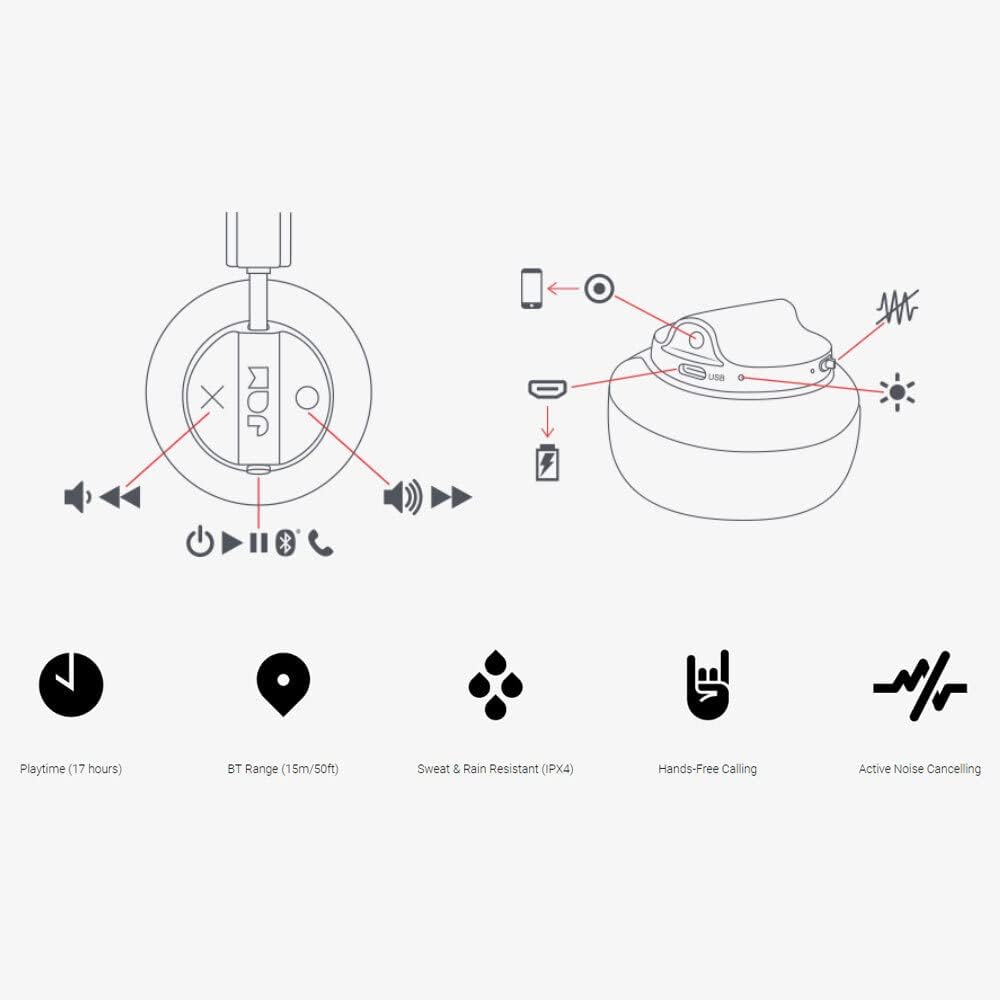
Image: Detailed diagram illustrating the control buttons and ports on the Jam Audio Out There headphones, including power, volume, track navigation, call management, and the charging port.
- Bişkojka Hêzê: Çapemenî û bigire ji bo ku hêz li ser / off.
- Volume Zêdetir / Tracka Piştre: Ji bo bilindkirina deng bi kurtî bikirtînin, û ji bo strana din bikirtînin dirêj.
- Volume Kêmkirin/Traça Berê: Ji bo daxistina deng bi kurtî bikirtînin, ji bo strana berê bikirtînin û dirêj bikirtînin.
- Play / Rawest / Bersiva Bangê: Single press to play/pause music or answer/end a call.
- Active Noise Cancelling (ANC) Switch: Toggle to activate or deactivate noise cancellation.
- Porta barkirinê: Porta Micro USB ji bo şarjkirinê.
- Porta AUX-in: Jack 3.5 mm ji bo girêdana dengê bi kabloyî.
Damezirandin
1. Barkirina Headphones
Before first use, fully charge your headphones. Connect the provided USB charging cable to the charging port on the headphones and the other end to a USB power source. The LED indicator will show charging status and turn off when fully charged. A full charge takes approximately 2 hours and provides up to 17 hours of playtime.

Image: The Jam Audio Out There headphones provide up to 17 hours of playtime on a single charge.
2. Hêzdarkirina / Off
- To power on: Press and hold the Power button for 3 seconds. The LED indicator will flash.
- To power off: Press and hold the Power button for 3 seconds. The LED indicator will turn off.
3. Hevgirtina Bluetooth
- Piştrast bikin ku guhên jêhatî ne.
- Press and hold the Power button for 5 seconds until the LED indicator flashes red and blue, indicating pairing mode.
- Li ser cîhaza xwe (smartphone, tablet, komputer), Bluetooth-ê çalak bike û li cîhazên berdest bigere.
- Select "JAM Out There" from the list of devices.
- Once paired, the LED indicator on the headphones will turn solid blue.
- The headphones have a Bluetooth range of up to 15 meters (50 feet).

Image: The Jam Audio Out There headphones offer Bluetooth compatibility, allowing a range of up to 15 meters or 50 feet from your connected device.
Telîmatên Operating
Playback Muzîkê
- Lîstik / Rawestandin: Bişkoka Play/Pause carekê bikirtînin.
- Tracka Piştre: Bişkojka Volume Up dirêj bikirtînin.
- Traopa Berê: Bişkojka Volume Downê dirêj bikirtînin.
- Guhertina Volume: Short press the Volume Up or Volume Down buttons.
Banga Hands-Free
- Bersiv/Dawiya Bangê: Bişkoka Play/Pause carekê bikirtînin.
- Bang red kirin: Bişkojka Play/Pause 2 çirkeyan pêl bike û bigire.
- Gazî Bikin: Initiate the call from your connected device. The audio will automatically transfer to the headphones.
- Music will automatically pause during a call and resume after the call ends.
Betalkirina Dengê Çalak (ANC)
- To activate ANC: Slide the ANC switch to the ON position. The ANC indicator light will illuminate.
- To deactivate ANC: Slide the ANC switch to the OFF position. The ANC indicator light will turn off.
- Using ANC can reduce ambient noise, enhancing your listening experience. Note that ANC can be used independently or with Bluetooth audio.
Wired Connection (AUX-in)
For a wired connection, use the provided 3.5mm AUX cable. Plug one end into the headphone's AUX-in port and the other into your audio device. This allows you to continue listening even if the headphone battery is depleted or if Bluetooth is not available.
Lênerrînî
- Paqijî: Guhguhkan bi qumaşek nerm û hişk paqij bikin. Kîmyewiyên dijwar an jî madeyên aşınker bikar neynin.
- Embarkirinî: Guhguhkan li cîhekî sar, hişk û dûr ji germahiyên zêde hilînin.
- Berxwedana avê: These headphones are IPX4 rated, meaning they are resistant to sweat and light splashes of water. Do not submerge them in water or expose them to heavy rain. Ensure the charging port cover is securely closed when not charging to maintain water resistance.
- Lênêrîna Pîl: Ji bo dirêjkirina temenê bateriyê, ji valakirina pir caran a guhguhkan dûr bisekinin. Wan bi rêkûpêk şarj bikin, her çend ji bo demek dirêj neyê bikar anîn jî.
Çareserkirina pirsgirêkan
| Pirsegirêk | Çare |
|---|---|
| Guhguhk vêna nabin | Ensure the headphones are charged. Connect to a power source using the USB cable. |
| Bi rêya Bluetooth-ê nayê hevberkirin |
|
| Bê deng an dengek kêm |
|
| Active Noise Cancelling not working | Ensure the ANC switch is in the ON position and the ANC indicator light is illuminated. |
| Headphones falling apart or breaking | While the product is designed for durability, excessive force or improper handling can cause damage. Handle with care. If issues persist, refer to warranty information. |
Specifications
- Navê Model: Li wir
- Hejmara Model: HX-HP303BK
- Têkilî: Bluetooth, 3.5 mm Jack (AUX-in)
- Rêzeya Wireless: Heta 15 metre (50 ling)
- Jiyana Pîlê: Heta 17 saetan
- Kontrola deng: Betalkirina Dengê Çalak
- Berxwedana avê: IPX4 Rated (Sweat and Rain Resistant)
- Cihê guh: Li ser guhê
- Mal: Rubber, Silicone
- Giraniya Babetê: 5.1 ons (0.32 Pound)
- Mezinahiyên hilberê: 8.58 x 3.19 x 8.66 inches
- Pêkhateyên Tevlî: Headphones, Charging Cord, AUX Cable
Vîdyoya Berhemê Bi Dawî Bûview
Ji bo nêrînek dîtbarî vîdyoya fermî ya vê hilberê temaşe bikinview of the Jam Audio product line, including the Out There headphones.
Video: An official Jam Audio sizzle video showcasing various products, including the Out There headphones, highlighting their design and features.
Garantî û Piştgirî
For warranty information, product registration, or technical support, please refer to the official Jam Audio webmalperê an jî bi karûbarê xerîdar re têkilî daynin. Belgê kirînê ji bo îdiayên garantiyê biparêzin.