
1. Destpêk
This manual provides detailed instructions for the setup, operation, and maintenance of your myTouchSmart Indoor Plug-in Simple Set Digital Timer, Model 26892-T5. Please read this manual thoroughly before using the device to ensure proper function and safety.
The myTouchSmart Digital Timer is designed to automate indoor lighting and electronics, allowing you to schedule their operation for convenience and energy efficiency.
2. Hilbera Serîview
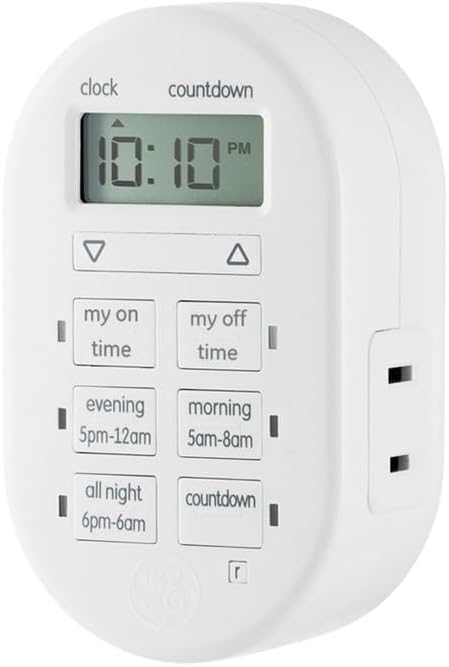
jimar 1: Pêşde view of the myTouchSmart Indoor Plug-in Simple Set Digital Timer. The device is white, oval-shaped, with a digital display at the top showing "10:10 PM". Below the display are two arrow buttons (up and down). Further down are six rectangular buttons arranged in two columns: "my on time", "my off time", "evening 5pm-12am", "morning 5am-8am", "all night 6pm-6am", and "countdown". A polarized outlet is visible on the right side.
The myTouchSmart Digital Timer features a compact design with a clear digital display and intuitive control buttons. It includes a single polarized outlet for connecting your device.
Pêkhateyên sereke:
- Digital Display: Shows current time, program settings, and countdown status.
- Tîrên Jor/Jêr: Used to adjust time and program settings.
- "My On Time" Button: Sets a custom turn-on time.
- "My Off Time" Button: Sets a custom turn-off time.
- Bişkokên Pêşkêşkirî: "Evening (5pm-12am)", "Morning (5am-8am)", "All Night (6pm-6am)" for quick scheduling.
- "Countdown" Button: Activates a countdown timer.
- Polarized Outlet: For connecting the appliance or light to be controlled.
- Nîşaneyên LED şîn: Show active programs.
3. Taybetmendî
- Easy-to-set digital timer for indoor lighting and electronics.
- Flexible scheduling options including custom daily On/Off times.
- Three available daily presets: Evening (5pm-12am), Morning (5am-8am), or All Night (6pm-6am).
- Customizable countdown feature (up to 24 hours in 1-minute intervals).
- Blue LED indicators show active programs.
- Large LCD screen for effortless viewing.
- One (1) polarized outlet.
- Compatible with LED, CFL, Incandescent, and Halogen bulbs, including dimmable LED and CFL bulbs.
- Backup battery saves timer settings during power outages or disconnections.
4. Sazkirin
4.1 Hêza Destpêkê
- Unpack the timer from its packaging.
- Plug the timer into a standard 125V wall outlet. The display will illuminate.
- Allow the timer to charge its internal backup battery for approximately 15 minutes before programming. This ensures settings are retained during power interruptions.
4.2 Danîna Dema Niha
- Bişkojk û bigire SEET button (located above the display) until the time digits begin to flash.
- Bi kar tînin UP (▲) û JÊR (▼) arrow buttons to adjust the hour. Pay attention to the AM/PM indicator.
- Bitikîne SEET button again to move to the minutes setting.
- Bi kar tînin UP (▲) û JÊR (▼) arrow buttons to adjust the minutes.
- Bitikîne SEET button one more time to save the current time and exit the setting mode.
5. Telîmatên Operating
Connect the appliance or light you wish to control into the polarized outlet on the right side of the timer.
5.1 Setting Custom On/Off Times ("My On Time" / "My Off Time")
- Bitikîne MY ON TIME button. The display will show "ON" and the time will flash.
- Bi kar tînin UP (▲) û JÊR (▼) arrow buttons to set the desired turn-on hour, then press MY ON TIME again to set minutes.
- Once the desired ON time is set, press MY ON TIME to confirm. A blue LED indicator next to the button will light up, indicating the program is active.
- Repeat the process for the MY OFF TIME button to set the desired turn-off time. A blue LED indicator next to the button will light up.
- To deactivate a custom program, press the corresponding MY ON TIME or MY OFF TIME button until the blue LED indicator turns off.
5.2 Bikaranîna Bernameyên Pêşwextkirî
The timer offers three convenient preset programs:
- EVENING (5pm-12am): Turns on at 5:00 PM and off at 12:00 AM.
- MORNING (5am-8am): Turns on at 5:00 AM and off at 8:00 AM.
- ALL NIGHT (6pm-6am): Turns on at 6:00 PM and off at 6:00 AM.
To activate a preset program, simply press the corresponding button (ÊVAR, SIB, an ALL NIGHT). A blue LED indicator next to the button will light up, confirming the program is active. To deactivate, press the button again until the LED turns off.
5.3 Bikaranîna Demjimêra Jimartinê
- Bitikîne COUNTDOWN button. The display will show "CD" and the time will flash.
- Bi kar tînin UP (▲) û JÊR (▼) arrow buttons to set the desired countdown duration (up to 24 hours, in 1-minute intervals).
- Rojnamevanî COUNTDOWN again to start the countdown. The blue LED indicator will light up.
- The connected device will turn ON (if currently OFF) or OFF (if currently ON) after the countdown duration expires.
- Ji bo betalkirina jimartinê, pêl pê bikin COUNTDOWN button again until the blue LED indicator turns off.
Note: Only one program (custom or preset) can be active at a time. Activating a new program will deactivate any previously active program. The countdown timer operates independently but will override other programs for its duration.
6. Maintenance
6.1 Paqijkirin
To clean the timer, unplug it from the wall outlet. Use a soft, dry cloth to wipe the exterior. Do not use liquid cleaners or abrasive materials, as these may damage the device.
6.2 Piştgirîya Pîlê
The timer includes an internal backup battery to retain settings during power outages. This battery is not user-replaceable and is designed to last the lifetime of the product. Ensure the timer is plugged in for at least 15 minutes initially to charge this battery.
7. Destpêkirin
| Pirsegirêk | Sedema gengaz | Çare |
|---|---|---|
| Nîşandana demjimêrê vala ye. | Elektrîk naçe prizê. | Check the wall outlet with another device. Ensure the timer is fully plugged in. |
| Connected device does not turn On/Off. | Program not active or incorrect settings. | Verify the blue LED indicator for the desired program is lit. Recheck your custom or preset time settings. Ensure the connected device is switched ON. |
| Mîheng piştî qutkirina elektrîkê winda dibintage. | Backup battery not sufficiently charged. | Ensure the timer is plugged in for at least 15 minutes to charge the backup battery. If issues persist, the battery may be depleted (not user-replaceable). |
| Timer is not responding to button presses. | Xeletiya nermalava demkî. | Unplug the timer from the wall outlet for 30 seconds, then plug it back in. This may reset the device. |
8. Specifications
- Hejmara Model: 26892-T5
- Nîşan: myTouchSmart
- Reng: Spî
- Rêjeyên Elektrîkê: 125V, 50/60 Hz, 15A 1875W General Purpose / Resistive, 10A 1250W Tungsten, ½ HP
- Mezinahiyên hilberê: 2.55 x 5.92 x 7.3 inches
- Giraniya Babetê: 4 onsan
- Tîpa Derketinê: 1 Polarized Outlet
- Lihevhatî: LED, CFL, Incandescent, Halogen bulbs (including dimmable LED/CFL)
- Sertîfîka: UL Listed
9. Garantî û Piştgirî
9.1 Garantiya Limited
This myTouchSmart Digital Timer is backed by a ermanî sînor yek-salî. For details regarding warranty coverage and claims, please refer to the warranty card included with your product or visit the manufacturer's official website.
9.2 Piştgiriya Mişterî
For technical assistance, troubleshooting not covered in this manual, or general inquiries, please contact myTouchSmart customer support. Contact information can typically be found on the product packaging or the official myTouchSmart website.
Please have your model number (26892-T5) and purchase date available when contacting support.