
Comix CS-3302
Comix CS-3302 12-Digit Desktop Calculator User Manual
Model: CS-3302 (P/N: 11821063)
Brand: Comix
1. Destpêk
This user manual provides comprehensive instructions for the Comix CS-3302 12-Digit Desktop Calculator. Please read this manual thoroughly before using the calculator to ensure proper operation and to maximize its lifespan. This calculator is designed for general office and school use, featuring a large LCD display, dual power source, and various calculation functions.
2. Agahiyên Ewlekariyê
- Do not expose the calculator to extreme temperatures, direct sunlight, or high humidity.
- Ji avêtina hesabê an jî lêdanên dijwar dûr bisekinin.
- Do not attempt to disassemble or modify the calculator. This will void the warranty.
- Use a soft, dry cloth for cleaning. Do not use liquid cleaners or abrasive materials.
- Dûr negihêjin zarokên piçûk.
3. Hilbera Serîview

jimar 3.1: Pêşde view of the Comix CS-3302 Desktop Calculator, showing the large LCD display and full keypad.
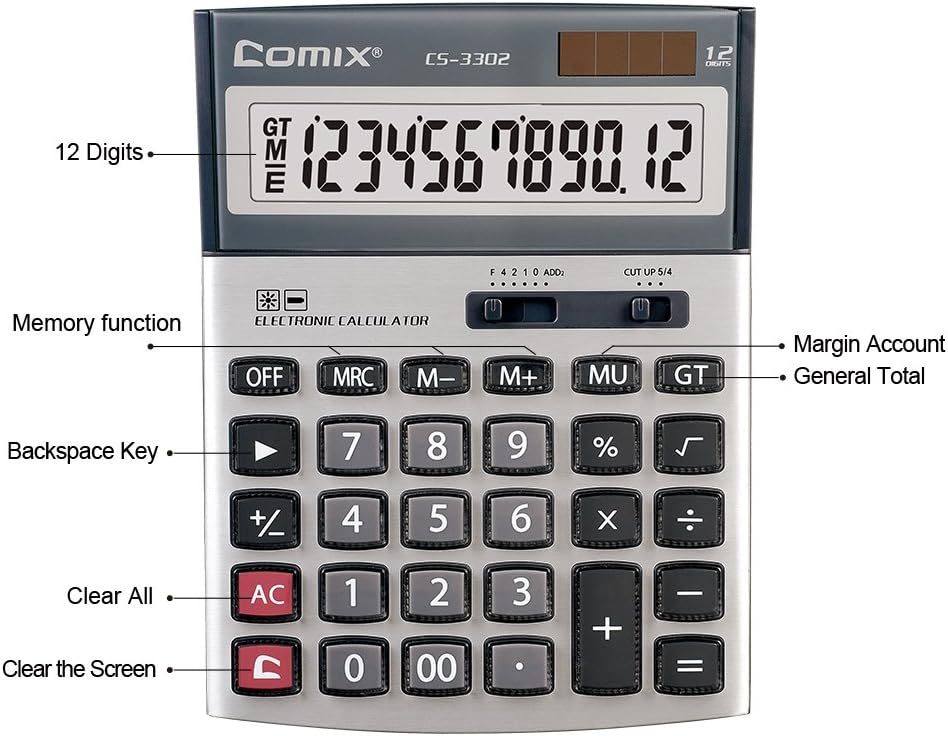
jimar 3.2: Key functions and display features of the Comix CS-3302 Calculator, including 12 digits display, memory functions, and clear keys.

jimar 3.3: Dimensions of the Comix CS-3302 Calculator, showing its compact and ergonomic design.

jimar 3.4: Angled view of the Comix CS-3302 Calculator, highlighting its sleek profile and key layout.

jimar 3.5: Side profile of the Comix CS-3302 Calculator, showing its slim design.

jimar 3.6: Retail packaging of the Comix CS-3302 Calculator, highlighting key features like 12 digits, dual power, and acrylic keys.
4. Sazkirin
4.1 Çavkaniya Hêzê
The Comix CS-3302 calculator operates on a dual power system: solar and battery. The solar panel provides power in well-lit environments, while a single AA battery (not included) serves as an auxiliary power source for low-light conditions or when solar power is insufficient.
- Sazkirina Pîlê: Locate the battery compartment on the back of the calculator. Open the cover and insert one AA battery, ensuring correct polarity (+/-). Close the battery compartment cover securely.
- Hêza Destpêkê: The calculator should power on automatically when sufficient light is available or with the battery installed. If not, press the ON/AC pişkov.
5. Telîmatên Operating
5.1 Operasyonên bingehîn
- Zêdebûn (+): Hejmarê yekem binivîse, bitikîne +, hejmara duyem binivîse, paşê pêl bike =.
- Jêkirin (-): Hejmarê yekem binivîse, bitikîne -, hejmara duyem binivîse, paşê pêl bike =.
- Pirkirin (×): Hejmarê yekem binivîse, bitikîne ×, hejmara duyem binivîse, paşê pêl bike =.
- Dabeşkirin (÷): Hejmarê yekem binivîse, bitikîne ÷, hejmara duyem binivîse, paşê pêl bike =.
- Percentage (%): Hejmarê binivîse, pêl bike × (an ÷), enter the percentage value, then press %. Ji bo exampji bo hesabkirina %10ê 200, 200 binivîse × 10 %.
- Koka Çargoşe (√): Enter the number, then press √.
5.2 Fonksiyonên Taybet
- JI: Powers off the calculator.
- AC (Hemû zelal): Clears all entries and memory, resetting the calculator to its initial state.
- C (Clear Entry): Clears the last entered number or the current display value without affecting previous calculations or memory.
- Backspace (►): Reqema dawî ya têketî jê dibe.
- M+ (Memory Plus): Nirxa nîşankirî li bîranînê zêde dike.
- M- (Memory Minus): Nirxa nîşankirî ji bîrê derdixe.
- MRC (Bibîranîna Bîrê / Paqij): Ji bo vegerandina nirxa bîrê carekê bikirtînin. Ji bo paqijkirina bîrê du caran bikirtînin.
- MU (Mark Up / Margin Account): Used for profit margin calculations. Enter cost, press MU, enter selling price, then press = to get the profit margin.
- GT (Tevahiya Mezin): Accumulates the results of all calculations. Pressing GT displays the grand total.
- +/- (Guhertina Nîşanê): Nîşana hejmara nîşankirî diguherîne (erênî bo neyînî, an neyînî bo erênî).
5.3 Decimal and Rounding Settings
The calculator features two slide switches at the top for controlling decimal places and rounding:
- Decimal Selector (F 4 2 1 0 ADD2):
- F (Floating Decimal): Hemû reqemên desimal ên berdest nîşan dide.
- 4, 2, 1, 0: Sets the number of decimal places to 4, 2, 1, or 0 respectively.
- ADD2 (Add Mode): Automatically adds two decimal places to all results, useful for currency calculations.
- Rounding Selector (CUT UP 5/4):
- CUT (Cut Off): Truncates the number, discarding all digits beyond the set decimal places.
- UP (Round Up): Rounds up the last digit if there are any non-zero digits beyond the set decimal places.
- 5/4 (Round Half Up): Rounds up if the first discarded digit is 5 or greater, otherwise rounds down.
6. Maintenance
- Paqijî: Wipe the calculator surface with a soft, dry cloth. For stubborn dirt, slightly dampen the cloth with water, but ensure no liquid enters the calculator. Do not use chemical cleaners.
- Embarkirinî: Dema ku hûn ji bo demek dirêj bikar neynin, hesabkerê li cîhek sar, hişk û dûr ji tîrêjên rojê yên rasterast û germahiyên zêde hilînin.
- Guhertina Pîl: If the display becomes dim or unresponsive in low light, replace the AA battery. Ensure the calculator is off before replacing the battery.
7. Destpêkirin
| Pirsegirêk | Sedema gengaz | Çare |
|---|---|---|
| Nîşandan vala an tarî ye. | Ronahîya têrê nake ji bo enerjiya rojê, an jî pîlê kêm e. | Move to a brighter area or replace the AA battery. |
| Encamên hesabkirina şaş. | Incorrect input, incorrect decimal/rounding settings, or memory interference. | Rojnamevanî AC to clear all and restart. Check decimal and rounding switch positions. Ensure correct key presses. |
| Bişkok bêbersiv in. | Calculator frozen or physical damage. | Biceribînin JI paşan ON/AC. If problem persists, remove and reinsert battery. If still unresponsive, contact support. |
8. Specifications
| Nîşan | Comix |
| Hejmara Model | CS-3302 (P/N: 11821063) |
| Pêşkêşî | LCD-ya 12-reqemî |
| Çavkaniya Hêzê | Dual Power (Solar & 1x AA Battery - not included) |
| Mal | Acrylic, Metal |
| Pîvan (L x W x H) | Nêzîkî 23.6 x 15.7 x 4.3 cm (9.3 x 6.2 x 1.7 înç) |
| Pîvan | Nêzîkî 322 g (0.71 lbs) |
| Germahiya xebitandinê | -25 ℃ to +60 ℃ (-13 ℉ to +140 ℉) |
| UPC | 842064102524 |
9. Garantî û Piştgirî
Comix products are designed for quality and durability. This product comes with a Garantiya 3-salî ji roja kirînê ve, ku kêmasiyên di materyal û karîgeriyê de di bin karanîna normal de vedihewîne.
For warranty claims, technical support, or any inquiries regarding your Comix CS-3302 calculator, please contact Comix customer service through their official website or the retailer where the product was purchased. Please have your proof of purchase and the product model number ready when contacting support.
For more information, visit the official Comix webmalper: www.comix.com
Ask a question about this manual
Ask about setup, troubleshooting, compatibility, parts, safety, or missing instructions. Manuals+ will review the question and use this page’s manual context to help answer it.