
1. Destpêk
Thank you for choosing the EJEAS V8 Bluetooth Intercom Motorcycle Helmet Headset. This device is designed to enhance your riding experience by providing seamless communication and entertainment. It supports full-duplex communication among up to 5 riders simultaneously, with a communication range of up to 1200 meters under ideal conditions. Featuring Bluetooth 3.0, NFC functionality, FM radio, and a convenient remote control, the V8 offers a comprehensive solution for motorcycle communication.
2. Agahiyên Ewlekariyê
Please read all safety information carefully before using the EJEAS V8. Improper use may result in damage to the device or personal injury.
- Her tim ewlehiya rê bidin pêşiyê. Amûrê bi awayekî ku bala we ji ajotinê dûr bixe bikar neynin.
- Adjust volume to a safe level. Excessive volume can damage your hearing and prevent you from hearing important traffic sounds.
- Hewl nedin ku cîhazê ji hev veqetînin an biguherînin. Ev dikare garantiyê betal bike û zirarê bide.
- Keep the device away from extreme temperatures, moisture, and corrosive substances.
- Ensure the device is securely mounted to your helmet and the remote control to your handlebar to prevent detachment during riding.
3. Naveroka pakêtê
Piştrast bike ku hemû tiştên ku li jêr hatine navnîş kirin di pakêta te de hene:
- 1 x EJEAS V8 Intercom Unit
- 1 x Remote Control
- 1 x Stereo Speaker with Microphone
- 1 x Clamp Çiyayê
- 1 x Screwdriver
- 2 x Screws
- 2 x Velcro Tapes (for speaker/microphone attachment)
- 1 x Cable Charging USB
- 1 x Manual Bikarhêner

Figure 3.1: Contents of the EJEAS V8 Intercom package. This image displays the main intercom unit, the remote control, the stereo speaker and microphone assembly, mounting clamps, a screwdriver, screws, Velcro tapes, a USB cable, and the user manual, all neatly arranged.
4. Hilbera Serîview
Familiarize yourself with the main components and controls of your EJEAS V8 intercom system.
4.1. Intercom Unit
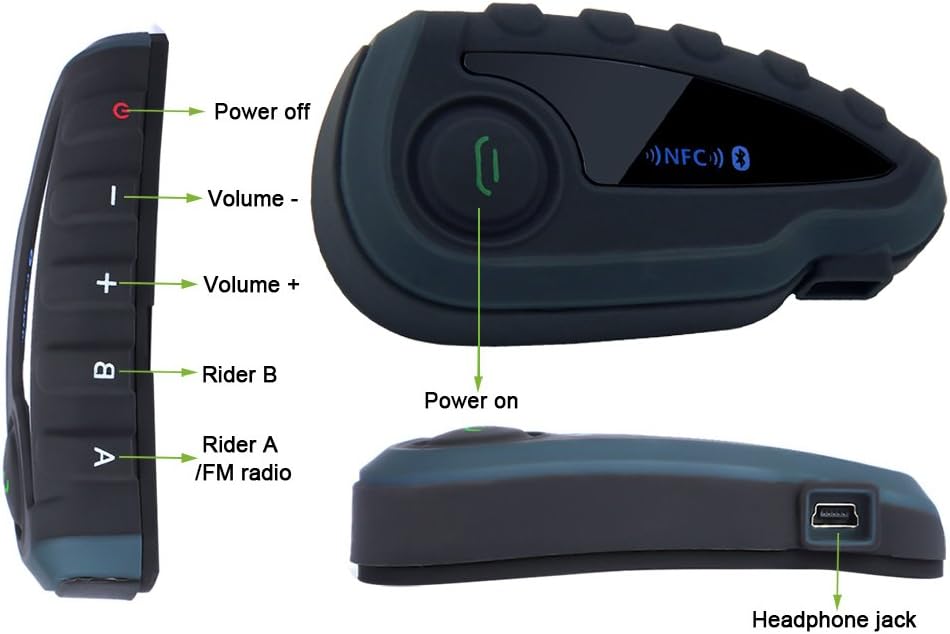
Wêne 4.1: Pêş û alî views of the EJEAS V8 intercom unit with key controls labeled. Labels include Power off, Volume -, Volume +, Rider B, Rider A/FM radio, Power on, and Headphone jack.

Wêne 4.2: Teqîn view of the EJEAS V8 intercom unit connected to its headset and microphone. Labels indicate Rider A, Rider B, Volume+, Phone/Play button, Volume-, Power off button, Headphone jack, Earpiece, and Microphone.
4.2. Remote Control

Figure 4.3: The EJEAS V8 remote control unit, designed for handlebar mounting. It features large, easy-to-press buttons for safe operation while riding.
5. Sazkirin
5.1. Barkirina Amûrê
Before first use, fully charge the V8 intercom unit. Connect the supplied USB cable to the charging port on the intercom unit and plug the other end into a USB power adapter (not included) or a computer USB port. The charging indicator will show the charging status. A full charge takes approximately 3 hours.
5.2. Sazkirina Kaskê
- Girêdana clamp mount to the side of your helmet. Ensure it is securely fastened.
- Slide the V8 intercom unit onto the clamp mount until it clicks into place.
- Position the stereo speakers inside the helmet, aligning them with your ears. Use the provided Velcro tapes to secure them.
- Attach the microphone to the inside of the helmet, ensuring it is close to your mouth for clear audio pickup.
- Connect the speaker and microphone cable to the headphone jack on the V8 intercom unit.

Figure 5.1: The EJEAS V8 intercom unit securely mounted on the side of a motorcycle helmet, ready for use.
5.3. Sazkirina Remote Control
Install the remote control on your motorcycle's handlebar for easy access during rides.
- cl vekeamp li ser kontrola dûr.
- Position the remote control on a suitable section of your handlebar.
- Bi ewlehî klamp to ensure the remote control does not move during operation.

Figure 5.2: The EJEAS V8 remote control unit mounted on a motorcycle handlebar, providing convenient access to controls while riding.
6. Telîmatên Operating
6.1. Power On / Off
- Hêzdarkirin: Press and hold the Power On button (refer to Figure 4.1) until the indicator light illuminates.
- Hêzdarkirin: Press and hold the Power Off button (refer to Figure 4.1) until the indicator light turns off.
6.2. Hevgirtina Bluetooth
The V8 supports pairing with smartphones, GPS devices, and MP3 players via Bluetooth.
- Hevberdana NFC: If your smartphone supports NFC, enable NFC on your phone and simply tap it against the NFC area on the V8 intercom unit. The devices will automatically recognize and pair.
- Pairkirina Manual: Put the V8 into pairing mode (refer to specific instructions in the included user manual for button combinations). On your device (phone, GPS, MP3), search for Bluetooth devices and select "EJEAS V8" from the list.
6.3. Têkiliya Înterkomê
The V8 allows full-duplex communication among up to 5 riders. The communication range is up to 1200 meters in open terrain.
- To initiate an intercom call with Rider A, press the 'Rider A' button.
- To initiate an intercom call with Rider B, press the 'Rider B' button.
- Follow the specific pairing instructions in the detailed user manual to connect multiple V8 units for group intercom.
6.4. Têlefonan
Once paired with your smartphone, the V8 supports hands-free calling.
- Bersiva Bangê: Press the Phone/Play button once.
- Banga Dawî: Press the Phone/Play button once during a call.
- Bang red kirin: Press and hold the Phone/Play button.
- Jimara dawîn ji nû ve bihejîne: Double-press the Phone/Play button.
6.5. Playback Music
Control music from your paired device directly through the V8.
- Lîstik / Rawestandin: Press the Phone/Play button once.
- Tracka Piştre: Bişkojka Volume + bikirtînin.
- Traopa Berê: Bişkojka Deng - bikirtînin.
6.6. Radyoya FM
The V8 features a built-in FM radio.
- Radyoya FMê Vekin/Girtin: Press the 'Rider A/FM radio' button (refer to Figure 4.1) to toggle the FM radio on or off.
- Kanalên Scan: Refer to the detailed user manual for specific button combinations to scan and save FM channels.
6.7. Volume Control
Adjust the volume for all audio outputs.
- Volume Zêde Bike: Bişkojka Volume + bikirtînin.
- Deng kêm bike: Bişkojka Deng - bikirtînin.
7. Maintenance
Proper maintenance ensures the longevity and optimal performance of your EJEAS V8 intercom.
- Paqijî: Nermek bikar bînin, damp cloth to wipe the surface of the intercom unit and remote control. Do not use harsh chemicals or abrasive cleaners.
- Embarkirinî: Dema ku hûn ji bo demek dirêj bikar neynin, cîhazê li cîhek sar û hişk, dûr ji tîrêjên rojê yên rasterast û germahiyên zêde hilînin.
- Lênêrîna Pîl: To preserve battery life, avoid fully discharging the battery frequently. Charge the device regularly, even if not in use.
8. Destpêkirin
If you encounter issues with your EJEAS V8, refer to the following common troubleshooting steps:
| Pirsegirêk | Sedema gengaz | Çare |
|---|---|---|
| Amûr bi hêz naçe | Bateriya wê kêm e; Amûr cemidî ye | Charge the device fully; Perform a hard reset (refer to manual for specific steps). |
| Cannot pair with phone/other device | Device not in pairing mode; Bluetooth off on phone; Too many paired devices | Ensure V8 is in pairing mode; Turn on Bluetooth on your phone; Clear previous pairings on V8 and try again. |
| Intercom range is short or connection is unstable | Obstructions; Interference; Too far apart | Ensure line of sight between units; Move away from sources of strong electromagnetic interference; Reduce distance between riders. |
| Deng ji hoparlêran tune ye | Speakers not connected; Volume too low; Faulty speakers | Check speaker connection to the V8 unit; Increase volume; Test with another headset if possible. |
Eger piştî ceribandina van çareseriyan pirsgirêk berdewam bike, ji kerema xwe bi piştgiriya xerîdar re têkilî daynin.
9. Specifications
Detailed technical specifications for the EJEAS V8 intercom system:
| Taybetî | Specification |
|---|---|
| Guhertoya Bluetooth | 3.0 |
| Cureyê Pîl | Lithium Polymer |
| Kapasîteya Pîl | 530 mAh |
| Dema axaftinê | Heta 8 saetan |
| Dema Rawestandinê | 120 saetan |
| Time Charging | Nêzîkî 3 saetan |
| Range Intercom | Up to 1200 meters (under ideal conditions) |
| Max Riders (Intercom) | 5 riders simultaneously |
| Teknolojiya Girêdanê | Bluetooth, NFC |
| Mezinahî (Berhem) | 23 x 4.8 x 16 cm |
| Giranî (Berhem) | 0.5 g (likely unit weight, not package) |
| Sertîfîkayên | CE, RoHS |
10. Garantî & Piştgirî
EJEAS provides a warranty for the V8 Bluetooth Intercom Motorcycle Helmet Headset.
- Serdema Garantiyê: Ev hilber ji roja kirînê ve bi 12 mehan garantiyek tê.
- Vegirtina Garantî: The warranty covers manufacturing defects and malfunctions under normal use. It does not cover damage caused by misuse, accidents, unauthorized modifications, or natural disasters.
- Piştgiriya Xerîdar: If you experience any issues with your product or have questions not covered in this manual, please contact EJEAS customer support through the retailer where you purchased the product or visit the official EJEAS website for contact information. Please have your purchase receipt and product model number ready when contacting support.