
1. Destpêk
This manual provides detailed instructions for the installation, operation, and maintenance of your ASUS X99-DELUXE motherboard. The ASUS X99-DELUXE is an ATX motherboard designed for high-performance computing, supporting Intel LGA 2011-3 processors and DDR4 memory.

Wêne 1: Ji jor ber bi jêr ve view of the ASUS X99-DELUXE Motherboard, showing the CPU socket, RAM slots, and heatsinks.
2. Taybetmendiyên sereke
- ASUS OC Socket: Designed to enhance 8-core CPU and DDR4 performance beyond standard X99 expectations.
- Piştgiriya Bîra DDR4: Features a special memory overclocking design, supporting DDR4 memory speeds up to 3200MHz (O.C.).
- Dual M.2 X4 Support: Provides two M.2 slots with PCIe 3.0 x4 interface, enabling data transfer speeds up to 32Gb/s for compatible NVMe SSDs.
- Fan Extension Card: Includes an extension card for advanced PC cooling management.
- Optimîzasyona 5-Alî: Utilizes Dual Intelligent Processors 5 for system optimization, including performance tuning, power saving, digital power control, and fan control.
- UEFI BIOS: Features a media-acclaimed Unified Extensible Firmware Interface (UEFI) BIOS for intuitive system configuration.
- SATA Express: Supports SATA Express for storage speeds up to 10Gb/s.
3. Sazkirin û Sazkirin
Berî destpêkirina sazkirinê, piştrast bikin ku pergala we hatiye qutkirin û ji çavkaniya hêzê hatiye veqetandin. Ji bo rêgirtina li ber rijandina statîk, motherboardê ji qiraxên wê bigirin.
3.1. CPU Installation (LGA 2011-3 Socket)
- Carefully open the CPU socket retention mechanism.
- Align the triangular mark on the CPU with the corresponding mark on the socket.
- CPU-yê bi nermî bêyî ku zorê lê bikî, têxe nav soketê.
- Close the retention mechanism to secure the CPU. Ensure no pins are bent during this process.

Wêne 2: Bişkavkirî view of the ASUS X99-DELUXE Motherboard, highlighting the LGA 2011-3 CPU socket.
3.2. Sazkirina Bîrê (DDR4)
The motherboard supports DDR4 memory modules. Refer to the motherboard manual for specific memory configurations and supported speeds.
- Klîpên li her du seriyên hêlîna DIMM vekin.
- Çîçeka li ser modula bîra DDR4 bi mifteya di hêlîna DIMM de re hevrêz bike.
- Modulê bi hişkî têxin nav qulikê heta ku klîp li cihê xwe biqelişin.
3.3. Storage Device Installation (M.2, SATA)
Install M.2 SSDs into the dedicated M.2 slots and SATA drives to the SATA ports. The motherboard supports SATA 3 (6Gb/s) and SATA Express.
3.4. Girêdana Peripherals
Connect your display, keyboard, mouse, and other peripherals to the rear I/O panel. The motherboard provides various USB ports, Ethernet ports, and audio jacks.
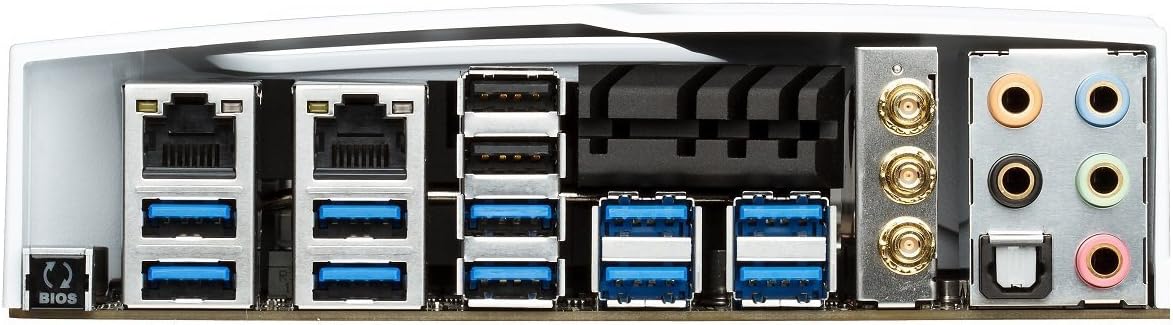
Figure 3: Rear I/O panel of the ASUS X99-DELUXE Motherboard, showing USB ports, Ethernet, and audio jacks.
4. Telîmatên Operating
4.1. UEFI BIOS Configuration
The UEFI BIOS allows you to configure system settings, boot options, and hardware parameters. To enter the BIOS, press the DEL key during system startup.
- Moda EZ: Provides a simplified interface for basic settings.
- Moda pêşketî: Offers comprehensive control over all motherboard features, including overclocking and fan control.
4.2. Driver Installation
After installing your operating system (e.g., Windows XP, as listed in specifications, and newer OS versions), install the necessary drivers for the motherboard chipset, audio, network, and other integrated components. These are typically provided on a support DVD or available for download from the ASUS website.
4.3. 5-Way Optimization
The 5-Way Optimization feature, accessible through ASUS software, automatically tunes your system for optimal performance, power efficiency, digital power delivery, and fan acoustics based on your usage. It is recommended to manage overclocking and fan settings directly within the BIOS for more precise control.
5. Maintenance
Parastina birêkûpêk dibe alîkar ku motherboarda we ji bo demek dirêj û xebata domdar misoger bike.
- Rakirina tozê: Bi hewaya pêçayî tozê ji motherboard û pêkhateyên sarkirinê bi awayekî periyodîk paqij bikin. Berî paqijkirinê, piştrast bikin ku pergal qutkirî ye û ji prizê hatiye derxistin.
- Kontrolên Têkiliyê: Verify that all cables and components are securely seated.
- Nûvekirinên BIOS-ê: Piştgiriya ASUS-ê kontrol bikin website for the latest BIOS updates to improve compatibility and performance. Follow update instructions carefully.
6. Destpêkirin
If you encounter issues with your ASUS X99-DELUXE motherboard, consider the following troubleshooting steps:
- Bê Hêz/Bê Boot:
- Piştrast bike ku hemî kabloyên hêzê (ATX-ya 24-pin, CPU-ya 8-pin) bi ewlehî ve girêdayî ne.
- Verify the power supply unit (PSU) is functioning correctly.
- Check the front panel power switch connection to the motherboard.
- Nîşanek tune:
- Confirm the graphics card is properly seated in its PCIe slot and has adequate power.
- Piştrast bike ku kabloya monitorê bi ewlehî bi karta grafîkê ve girêdayî ye.
- Heke gengaz be, bi kabloyek dîmenderê an monîtorek cûda biceribînin.
- Bêîstîqrarî/Qetlîbûna Sîstemê:
- Check RAM modules for proper seating; try reseating them or testing one module at a time.
- Ensure CPU cooler is correctly installed and making good contact with the CPU. Monitor CPU temperatures.
- Mîhengên BIOS-ê li gorî xwerûyan vegerînin.
- Bent CPU Socket Pins:
Bent pins in the CPU socket can cause severe system malfunctions or prevent booting. This type of damage is typically not covered under warranty. Exercise extreme caution during CPU installation to avoid bending pins.
7. Specifications
| Liq | Specification |
|---|---|
| Nîşan | ASUS |
| Navê Model | X99-DELUXE |
| CPU Socket | LGA 2011-3 |
| Prosesên Lihevhatî | Intel Core i7 (LGA 2011-3) |
| Cureyê Çîpsetê | Intel X99 |
| RAM Memory Technology | DDR4 |
| Memory Clock Speed | Heta 3200 MHz (OC) |
| Slots Bîra Berdest | 8 |
| Mezinahiya Herî Zêde ya Bîra RAMê | 64 GB |
| Navrûya Karta Grafikê | PCI Express |
| Total PCIe Ports | 5 |
| Total SATA Ports | 8 |
| Standarda Otobusa Sîstemê Piştgirîkirî | SATA 3 |
| Portên USB 2.0 | 2 (internal headers, total ports may vary) |
| Tevahiya Portên USB | Various (including USB 3.0 on rear I/O) |
| Hejmara Portên Ethernetê | 1 (Dual Gigabit LAN) |
| Type Connector Power Main | 24-Pin ATX |
| Amûrên Lihevhatî | Komputera Kesane |
| Rawesta axaftevan | Windows XP (and newer OS versions) |
| Babetê Weight | 4.44 Pound (nêzîkî 2.01 kg) |
8. Garantî û Piştgirî
Ji bo agahdariya garantiyê û piştgiriya teknîkî, ji kerema xwe serî li malpera fermî ya ASUS bidin. webmalperê an jî bi karûbarê xerîdar a ASUS-ê re têkilî daynin. Ji bo îdiayên garantiyê delîla kirîna xwe biparêzin.
Piştgiriya ASUS Webmalper: https://www.asus.com/support/
Note: Damage resulting from improper installation, misuse, or unauthorized modifications may void your product warranty.