
Pêşkêş
This manual provides comprehensive instructions for the setup, operation, and maintenance of your VTech CS6829-2 2-Handset Cordless Phone with Answering System. This system is designed for home use, offering features such as caller ID, a digital answering machine, backlit keypad, and a full duplex speakerphone for enhanced communication.
Di Box çi ye
Piştrast bike ku hemû tişt di pakêta te de ne:
- Yekîneya bingehîn
- 2 destikên bêtêl
- Charger
- 2 adapter
- 2 pakêtên pîlê
- Têla xeta telefonê
- Kevirê dîwarê
- Rêbernameya destpêka bilez
Damezirandin
Follow these steps to set up your VTech CS6829-2 phone system:
- Yekîneya bingehîn girêdin:
Plug one end of the telephone line cord into the TEL LINE jack on the back of the base unit. Plug the other end into a telephone wall jack. Plug the small end of the power adapter into the POWER jack on the back of the base unit. Plug the large end of the power adapter into a wall outlet not controlled by a wall switch.
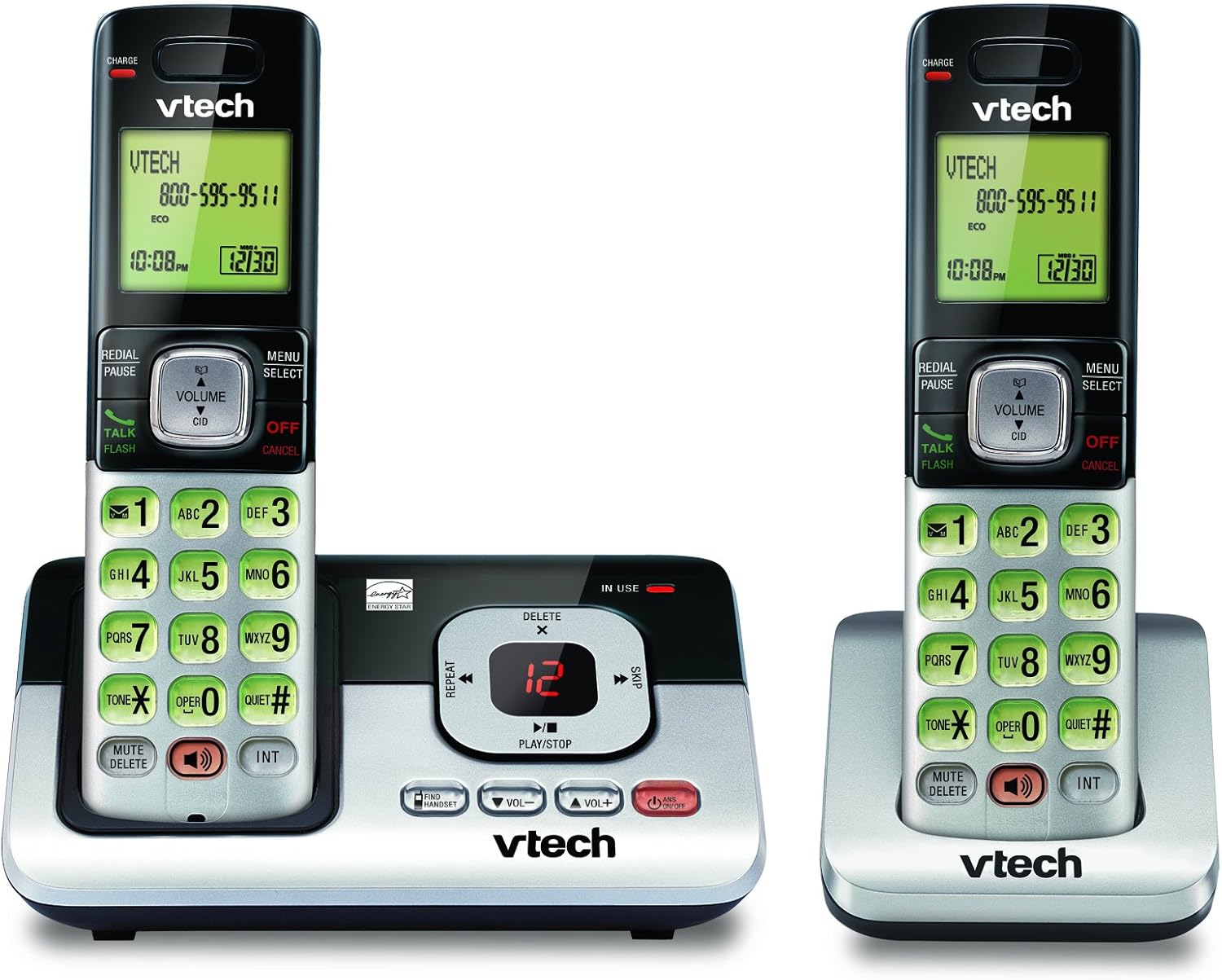
Image: The VTech CS6829-2 base unit with one handset docked, and a second handset with its charging cradle. This illustrates the main components of the phone system.
- Pîlên Telefonê Saz Bikin:
Open the battery compartment cover on the back of each handset. Connect the battery pack connector securely into the jack inside the compartment. Place the battery pack with the label facing up and tuck the wires inside the compartment. Close the battery compartment cover.
- Şarjkirina Telefonan:
Place each handset in the base unit or charger with the display facing up. The CHARGE light on the handset will illuminate, indicating proper charging. Allow the handsets to charge for at least 16 hours before initial use for optimal battery performance.

Wêne: Goşeyek view of the VTech CS6829-2 base unit with one handset docked, and the second handset in its separate charging cradle. This shows how the handsets are placed for charging.
- Dîrok û Demjimêr Bikin:
After the handsets are charged, follow the on-screen prompts or refer to the quick start guide to set the date and time. This is important for accurate caller ID and answering system timestamps.
Telîmatên Operating
Çêkirin û Bersiva Bangan
- Ji bo Bangek: Rojnamevanî TALK / FLASH or any dialing key to get a dial tone, then dial the phone number.
- Ji bo Bersiva Bangek: Dema ku têlefon lê dixe, pêl bike TALK / FLASH an jî bişkojka lêdanê.
- Ji bo Dawîkirina Bangek: Rojnamevanî JÎ / BALKIRIN or place the handset back in the base unit/charger.
Sîstema Bersîva Dîjîtal
- Peyamên Lîstinê: Li ser yekîneya bingehîn, çap bikin LÊZÎN/STOP. On a handset, press MENU/HILBIJARTIN, scroll to "Answering System", then select "Play Messages".
- Recording an Outgoing Announcement: On the base unit or handset, navigate to the answering system menu and select "Record OGM" (Outgoing Message).
- Jêbirina peyaman: While a message is playing, press JÊBIRIN on the base unit or handset.
Fonksiyona Speakerphone
- To Use Speakerphone: Di dema bangekê de, pêl pê bikin GOTEVAN button on the handset. Press it again to switch back to the handset earpiece.
Taybetmendiyên sereke
- Digital Answering System with LED Indicator and Volume Control: This system records up to 14 minutes of messages, announcements, and memos. An LED indicator notifies you of new messages. Volume control keys on the base allow easy adjustment of message playback volume.
- Caller ID / Call Waiting — Stores up to 50 Calls: Displays the name, number, time, and date of incoming calls, helping you identify callers before answering.
- Axaftvana Full Duplex: The handset features a full duplex speakerphone, enabling natural two-way conversations where both parties can speak and be heard simultaneously.
- Klavyeya paşîn û dîmender: The entire keypad and LCD screen on the handset illuminate, ensuring clear visibility and easy dialing even in low-light conditions.
- ECO Mode Power-Conserving Technology: This technology optimizes power consumption for extended battery performance and energy efficiency.
- Moda Bêdeng: Allows you to silence the ringer on both the handset and base unit immediately or for a set period, providing peace and quiet when needed.
Lênerrînî
- Paqijî: Telefon û yekîneya bingehîn bi kaxezek nerm paqij bikin.amp cloth. Do not use cleaning sprays or liquid cleaners.
- Lênêrîna Pîl: Replace batteries when they no longer hold a charge. Use only the specified battery type. Dispose of old batteries responsibly according to local regulations.
- Şertên Jîngehê: Avoid placing the phone in direct sunlight, near heat sources, or in areas with excessive moisture.
Çareserkirina pirsgirêkan
If you experience issues with your phone, try the following solutions:
| Pirsegirêk | Çare |
|---|---|
| Dengê dialê tune. | Ensure the telephone line cord is securely plugged into both the base unit and the wall jack. Check that the power adapter is plugged into a working electrical outlet. |
| Telefon nayê şarjkirin. | Ensure the handset is properly seated in the base unit or charger. Clean the charging contacts on both the handset and base/charger with a dry cloth. Verify the power adapter is connected. |
| Kalîteya dengî nebaş / Statîk. | Move the handset closer to the base unit. Avoid placing the phone near other electronic devices (e.g., microwaves, computers) that may cause interference. Check the telephone line cord for damage. |
| Sîstema bersivdayînê peyaman tomar nake. | Ensure the answering system is turned ON. Check if the memory is full; delete old messages if necessary. |
Specifications
| Taybetî | Hûrî |
|---|---|
| Hejmara Model | CS6829-2 |
| Mezinahiya Hilberê | 5.77 x 3.41 x 6.77 inches |
| Babetê Weight | 1.41 lîre |
| Batteries | 2 Hilber Batteriesên Taybet hewce ne (tevî) |
| Cureyê Pergala Bersivkirinê | Digital |
| Bîr ID Caller | Up to 50 calls |
| Answering System Recording Time | Heta 14 hûrdem |
| Reng | Reş/Zîv |
| Tîpa Telefonê | Cordless |
Garantî û Piştgirî
For warranty information and technical support, please refer to the warranty card included with your product or visit the official VTech webmalper. Rapora kirîna xwe wekî delîla kirînê ji bo îdîayên garantiyê biparêzin.
Her weha hûn dikarin serdana Dikana VTech li ser Amazonê ji bo agahdariya hilberê ya zêdetir û çavkaniyên piştgiriyê.