
Pêşkêş
This manual provides detailed instructions for the installation, operation, and maintenance of your VTech VTCS6619 DECT 6.0 Expandable Speakerphone with Caller ID. Please read this manual thoroughly before using your new telephone system to ensure proper functionality and to take full advantage ji taybetmendiyên wê.
Naveroka pakêtê
Piştrast bikin ku pakêta we tiştên jêrîn dihewîne:
- Cordless Phone with Caller ID/Call Waiting
- Telephone Base Unit
- Adapterê Hêza AC
- Cord Line Telefon
- Pîlê ji nû ve şarjkirî ji bo têlefonê
- Bergê Destan
Damezirandin
Follow these steps to set up your VTech VTCS6619 telephone system.
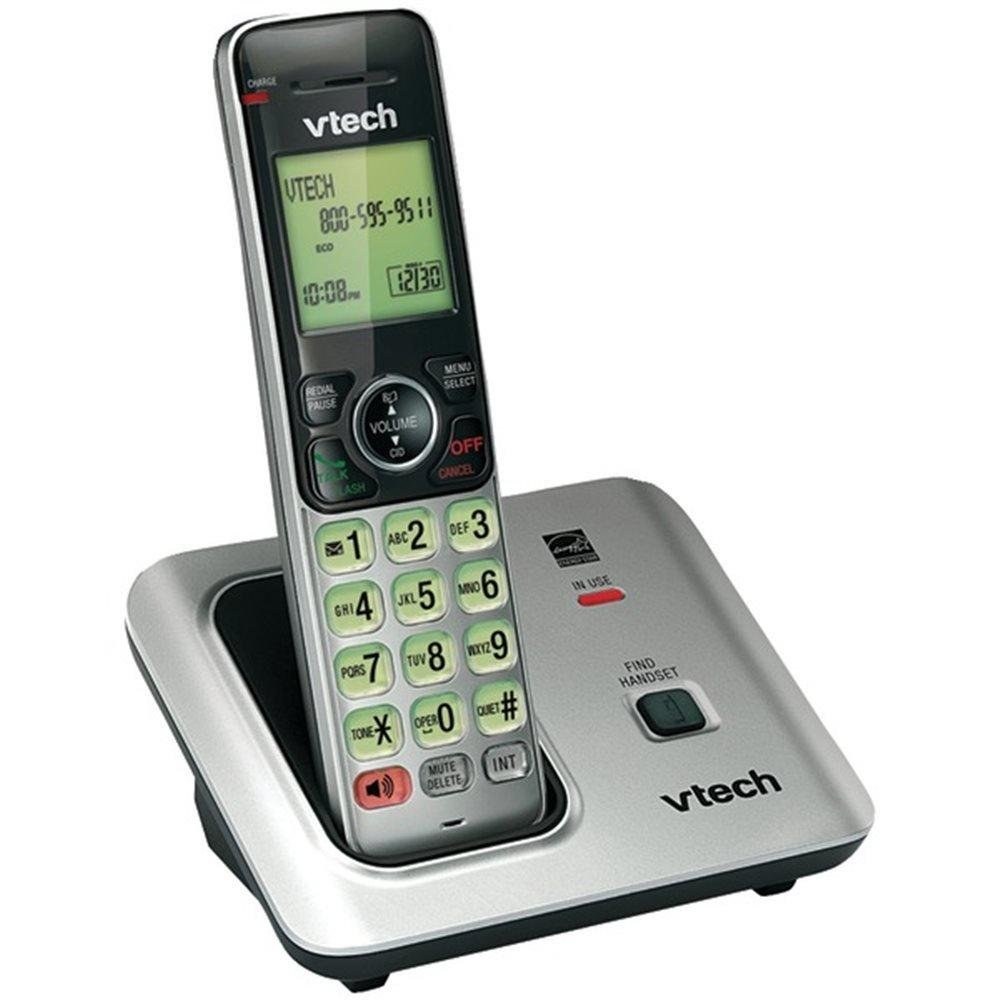
Image: The VTech VTCS6619 DECT 6.0 Cordless Speakerphone with Caller ID, showing the black handset and base unit.
1. Sazkirina Pîl
- Li ser pişta têlefonê qapaxa beşa pîlê vekin.
- Pêveka pakêta bateriyê bi ewlehî bi jack-a di hundurê beşê de ve girêdin.
- Place the battery pack with the label UP and tuck the wires neatly inside the compartment.
- Qepaxa beşa pîlê bigire.
2. Girêdana Yekîneya Bingehîn
- Plug the small end of the AC power adapter into the power jack on the back of the telephone base.
- Plug the large end of the AC power adapter into a wall outlet not controlled by a wall switch.
- Plug one end of the telephone line cord into the TEL LINE jack on the back of the telephone base.
- Serê din ê kabloya telefonê bi priza dîwarê telefonê ve girêdin.
3. Handset Charging
Once the battery is installed and the base unit is connected, place the handset on the telephone base. The CHARGE light on the handset will illuminate, indicating that the battery is charging. Allow the handset to charge for at least 10 hours before initial use.
Telîmatên Operating
This section details the basic functions and features of your VTech VTCS6619 phone.
Çêkirin û wergirtina bangan
- Ji bo Bangek: Rojnamevanî TALK / FLASH or GOTEVAN, paşê jimareya telefonê bigerîne.
- Ji bo Bersiva Bangek: Dema ku têlefon lê dixe, pêl bike TALK / FLASH or GOTEVAN.
- Ji bo Dawîkirina Bangek: Rojnamevanî GIRTÎ / PAKÎ or place the handset back on the telephone base.
Fonksiyona Speakerphone
To activate the speakerphone during a call, press the GOTEVAN button. Press it again to switch back to the handset earpiece.
Nasnameya Bangdêr û Hêviya Bangê
The phone displays the caller's name and number (if available) before you answer. If you subscribe to Call Waiting service, the phone will alert you to an incoming call while you are on another call. Press BIRÛSK ji bo guhertina di navbera bangên.
Banga Konferansê
The VTech VTCS6619 supports 3-way conference calls. While on a call, you can add a third party by pressing the BIRÛSK button, dialing the new number, and then pressing BIRÛSK again to connect all parties.
Sîstema Bersîva Dîjîtal
The integrated digital answering system records incoming messages when you are unavailable. Access messages by pressing the LÊZÎN/STOP button on the base or through the handset menu. Refer to the full user guide for detailed instructions on setting up your outgoing message and managing messages.
Lênerrînî
Proper care ensures the longevity of your telephone system.
Paqijî
Clean the telephone and base unit with a soft, damp cloth. Do not use cleaning sprays or liquid cleaners, as they may damage the finish or electrical components.
Lênêrîna Pîl
To maintain optimal battery performance, avoid exposing the handset to extreme temperatures. If the phone will not be used for an extended period, remove the battery to prevent leakage.
Çareserkirina pirsgirêkan
If you experience any issues with your phone, refer to the following common problems and solutions:
| Pirsegirêk | Çare |
|---|---|
| Dengê dialê tune | Ensure the telephone line cord is securely plugged into both the base unit and the wall jack. Check if the AC power adapter is properly connected. |
| Qalîteya dengê xerab | Move the handset closer to the base unit. Check for interference from other electronic devices. Ensure the battery is fully charged. |
| Telefon nayê şarjkirin | Verify the handset is correctly placed on the base unit. Clean the charging contacts on both the handset and base with a dry cloth. Check the power connection to the base unit. |
| Nasnameya bangker nayê nîşandan | Ensure you have subscribed to Caller ID service from your telephone service provider. The feature may not work if the caller has blocked their number. |
Specifications
- Nîşan: VTech
- Cins: VTCS6619
- Tîpa telefonê: Cordless
- Reng: Reş
- Hejmara Pîl: 1 bataryayên AAA hewce ne (tevî)
- Mal: Pîlastîk
- Çavkaniya hêzê: Battery Powered
- Tîpa Dialer: Deng
- Pîvanên Babetê (L x W x H): 6.9 x 5.2 x 6.7 inches
- Cureyê Pergala Bersiv: Digital
- Giraniya Babetê: 1 Pound
- Amûrên Lihevhatî: VTech CS6619 handsets, basic answering machines
- Kapasîteya Banga Konferansê: 3-rê
- Operasyona Piralî: Operasyona Single-Line
- Dema Rawestandina Telefonê: minutes 7200
- Nasnameya telefonê: Erê
Garantî û Piştgirî
Your VTech VTCS6619 telephone system is covered by a 1-Sal Garantiya Limited from the date of purchase. This warranty covers defects in material and workmanship under normal use. For warranty service or technical support, please refer to the contact information provided in your product packaging or visit the official VTech webmalper ji bo hûrguliyên karûbarê xerîdar.
Ji kerema xwe fatûreya kirîna xwe wekî delîla kirînê ji bo îdiayên garantiyê biparêzin.