
1. Destpêk
Spas ji bo kirînêasing the Caliber RMD 068-2 Car Radio USB/SD Player. This manual provides detailed instructions for the installation, operation, and maintenance of your new car radio. Please read this manual thoroughly before using the product to ensure proper functionality and safety. Keep this manual for future reference.
2. Agahiyên Ewlekariyê
- Lêkirinî: Ensure the unit is installed by a qualified technician to prevent damage to the vehicle's electrical system. Incorrect wiring can cause fire or electrical shock.
- Navê min: Amûrê tenê bi bataryayek otomobîlê ya 12V DC ya bi erdê neyînî ve girêdin.
- Sîgorteyan: Always replace fuses with new ones of the specified rating. Using an incorrect fuse can cause damage to the unit or vehicle.
- Asta Volume: Do not operate the unit at excessively high volume levels, as this may impair your ability to hear external traffic sounds and could be dangerous.
- Paqijî: Ji bo paqijkirinê qumaşek nerm û hişk bikar bînin. Paqijkerên abrasive an solvanan bikar neynin.
- Şilî: Yekîneyê li ber şil û avê nehêlin.
3. Naveroka pakêtê
Ji kerema xwe kontrol bikin ka hemî pêkhate hene:
- Caliber RMD 068-2 Car Radio Unit
- Panela Eniya veqetandî
- ISO Wiring Harness
- Çarçovê Stendinê
- Disassembly Keys (2 pcs)
- Manual Bikarhêner (ev belge)
4. Hilbera Serîview
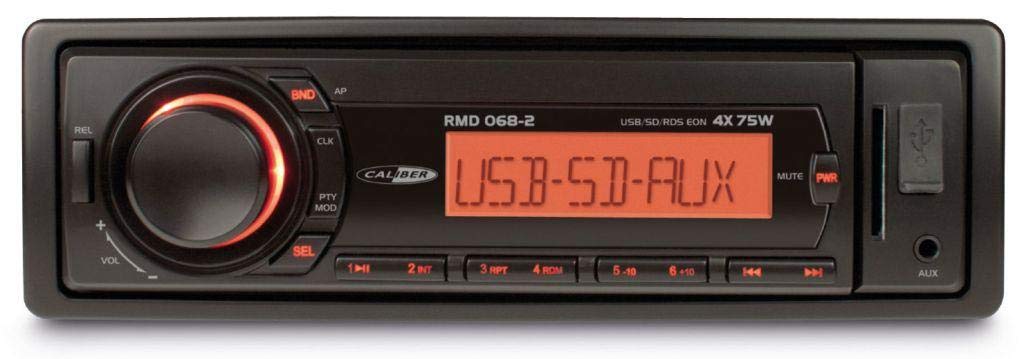
Wêne 1: Pêşî view of the Caliber RMD 068-2 Car Radio. This image shows the main unit with its detachable front panel, including the display, control buttons, USB port, and SD card slot.
4.1 Control Panel Eniya
- Bişkoka HÊZ/MODE: Press to turn on/off. Short press to switch between Radio, USB, SD, AUX modes.
- Kûçika VOLUME: Rotate to adjust volume. Press to access audio settings (Bass, Treble, Balance, Fader).
- PÊŞKÊŞÎ: Shows current time, radio frequency, track information, etc.
- Porta USB: Ji bo lîstina medyayê ajokarên flash ên USB-yê ve girêdin.
- Slota qerta SD: Ji bo lîstina medyayê kartên SD têxin.
- AUX Input (3.5mm Jack): Amûrên bihîstwerî yên derveyî ve girêdin.
- BAND/AMS Button: In radio mode, press to select radio band (FM1, FM2, FM3). Long press for Automatic Memory Store.
- Bişkokên PÊŞWEXTKIRÎ (1-6): Store and recall radio stations. In USB/SD mode, use for direct track selection.
- Bişkojka LÎSTIN/PAUSE: Play or pause media playback.
- FORWARD/BACKWARD Buttons: Skip tracks or tune radio frequency.
- Bişkoka EJECT: Release the detachable front panel.
4.2 Rear Connections
The rear of the unit features standard ISO connectors for power and speakers, along with an antenna input.
- ISO Power Connector: For connecting to the vehicle's power supply (constant 12V, ignition 12V, ground).
- ISO Speaker Connector: For connecting to the vehicle's speakers (Front Left, Front Right, Rear Left, Rear Right).
- Ketina antenna: For connecting the car's radio antenna.
5. Sazkirin
5.1 Sazkirin
- Pîlê qut bikin: Before starting, disconnect the negative terminal of your car battery to prevent short circuits.
- Yekîneya Kevin Rakirin: Carefully remove your existing car radio from the dashboard.
- Install Mounting Frame: Insert the supplied mounting frame into the dashboard opening and bend the tabs to secure it.
- Têlê girêdan: Refer to the wiring diagram in section 5.2. Connect the ISO wiring harness to the car's wiring and then to the Caliber RMD 068-2 unit. Connect the antenna cable.
- Slide Unit In: Carefully slide the Caliber RMD 068-2 unit into the mounting frame until it clicks into place.
- Pîl ji nû ve girêdin: Reconnect the negative terminal of your car battery.
- Panela Pêşî pêve bikin: Attach the detachable front panel to the main unit.
5.2 Diagrama Têlkirinê
The Caliber RMD 068-2 uses standard ISO connectors. Ensure correct connections as shown below. If your vehicle does not have ISO connectors, an adapter may be required.
| Pin No. | Rengê Têlê (Tîpîk) | Karkirin |
|---|---|---|
| 4 | Zer | Sabît 12V (Pîl) |
| 7 | Sor | 12V veguherî (Ignition) |
| 8 | Reş | Erd |
| 5 | Şîn | Antenna Remote Out |
| Pin No. | Rengê Têlê (Tîpîk) | Karkirin |
|---|---|---|
| 1 | Mor | Pişta rastê (+) |
| 2 | Mor / Reş | Pişta rastê (-) |
| 3 | Kesk | Pişta Çep (+) |
| 4 | Kesk/Reş | Paşê Çep (-) |
| 5 | Gewr | Pêşî rast (+) |
| 6 | Gewr/Reş | Pêşî Rast (-) |
| 7 | Spî | Eniya Çep (+) |
| 8 | Spî/Reş | Eniya Çep (-) |
Note: Wire colors may vary depending on vehicle manufacturer. Always consult your vehicle's wiring diagram.
6. Telîmatên Operating
6.1 Fonksiyonên bingehîn
- Power On / Off: Bitikîne POWER / MODE bişkojka ku yekîneyê vekin an vekin.
- Kontrolkirina Volume: Bizivirîne BEND bişkoja saetê bizivirînin da ku deng zêde bikin, li dijî saetê bizivirînin da ku deng kêm bikin.
- Hilbijartina Modê: Çapemeniya kurt POWER / MODE button to cycle through available modes: Radio (FM), USB, SD, AUX.
- Mîhengên Deng: Bitikîne BEND knob to enter audio settings. Rotate the knob to select settings like BASS, TREBLE, BALANCE, FADER. Press the knob again to confirm or move to the next setting.
6.2 Operasyona Radyoyê
- Hilbijartina Band: Di moda Radyoyê de, pêl bişkoka BAND / AMS button to switch between FM1, FM2, and FM3 bands.
- Tuning Manual: Çapemeniya kurt PÊŞ / PAŞ bişkokan ji bo mîhengkirina frekansê.
- Lêgerîna Xweser: Dirêj pêl pê bikin PÊŞ / PAŞ bişkokan bikar bînin da ku bixweber li stasyona bihêz a din bigerin.
- Pêşniyarên firotanê: Tune to your desired station. Long press one of the PRESET (1-6) buttons until you hear a beep. The station is now stored.
- Pêşniyarên bibîrxistin: Short press one of the PRESET (1-6) buttons to recall a stored station.
- Automatic Memory Store (AMS): Dirêj pêl pê bikin BAND / AMS button to automatically scan and store the strongest stations into the current band's presets.
6.3 Lêdana USB/SD
- Medyayê têxe: Insert a USB flash drive into the USB port or an SD card into the SD card slot. The unit will automatically switch to USB/SD mode and begin playback.
- Lîstik / Rawestandin: Bitikîne LÊZIN / PAUSE bişkojka ji bo sekinandin an ji nû ve lêdanê.
- Skip Track: Çapemeniya kurt PÊŞ / PAŞ bişkokên ku biçin ser şopa paşîn an berê.
- Pêşveçûna Bilez / Vegere: Dirêj pêl pê bikin PÊŞ / PAŞ buttons to fast forward or rewind within a track.
- Navîgasyona Peldankê: Bi kar tînin PÊŞKIRIN 5 û PÊŞKIRIN 6 buttons to navigate between folders on your USB/SD media.
6.4 Ketina AUX
- Amûra Têkilî: Connect your external audio device (e.g., smartphone, MP3 player) to the 3.5mm AUX input jack on the front panel using an audio cable.
- Moda AUX hilbijêre: Bitikîne POWER / MODE bişkojkê çend caran bikirtînin heta ku "AUX" xuya bibe.
- Kontrola Playback: Control playback (play, pause, skip) directly from your connected external device. The car radio will control the volume.
7. Maintenance
- Paqijkirina yekîneyê: Use a soft, dry cloth to wipe the front panel and display. Do not use harsh chemicals, cleaning sprays, or abrasive cloths, as these can damage the surface.
- Panela Pêşiyê ya Veqetandî: When detaching the front panel, handle it carefully. Store it in a protective case (if supplied) to prevent scratches or damage.
- Portên USB/SD: Keep the USB port and SD card slot free from dust and debris.
8. Destpêkirin
| Pirsegirêk | Sedema gengaz | Çare |
|---|---|---|
| Hêz tune | Fîzyona teqiyayî; Têlên xelet; Girêdana sist | Check and replace fuse; Verify wiring connections (Yellow to constant 12V, Red to ignition 12V, Black to ground); Ensure front panel is securely attached. |
| Deng tune | Volume too low; Mute activated; Incorrect speaker wiring; Damaged speakers | Increase volume; Check if mute is active; Verify speaker connections; Test with known good speakers. |
| Wergirtina radyoyê xirab e | Antenna not connected; Damaged antenna; Weak signal area | Ensure antenna is securely connected; Check antenna for damage; Try tuning to a stronger station or move to a different location. |
| USB/SD nalîze | Piştgirî nekirin file format; Corrupted media; Incorrectly inserted media; Max capacity exceeded | Pêredîtin files are MP3/WMA format; Try a different USB/SD card; Reinsert media correctly; Check media capacity (max 32GB recommended). |
| Front panel cannot be detached | Eject button not fully pressed; Mechanism jammed | Press the EJECT button firmly; Do not force the panel. |
If the problem persists after trying these solutions, please contact your dealer or a qualified service center.
9. Specifications
- Cins: Caliber RMD 068-2
- Derketina Hêzê: 4 x 75 Watts Max
- Navê min: 12V DC (10.8V-15.6V), Negative Ground
- Fitîl: 10A
- Formatên Dengê piştgirî: MP3, WMA (via USB/SD)
- USB/SD Compatibility: Heta 32GB (formata FAT32)
- FM Tuner: RDS, 18 Presets
- Ketina AUX: 3.5mm Stereo Jack
- Panela Pêşiyê ya Veqetandî: Erê
- Pîvan: Nêzîkî 0.95 kg (2.09 lbs)
10. Garantî û Piştgirî
This Caliber product is covered by a warranty in accordance with applicable European laws. For detailed warranty terms and conditions, please refer to the warranty card included with your product or visit the official Caliber website. For technical support, troubleshooting assistance, or service inquiries, please contact your authorized Caliber dealer or the customer service department in your region. Please have your product model number (RMD 068-2) and proof of purchase ready when contacting support.
Note: Specifications and design are subject to change without notice for improvement.


