
VOLTCRAFT GOS-632 FG
VOLTCRAFT GOS-632 FG Oscilloscope with Frequency Generator User Manual
1. Destpêk
This manual provides essential information for the safe and efficient operation of your VOLTCRAFT GOS-632 FG Oscilloscope with Frequency Generator. Please read this manual thoroughly before using the device and keep it for future reference. The GOS-632 FG is a 30 MHz dual-channel analog oscilloscope integrated with a frequency generator, designed for various electronic measurement and testing applications.
2. Telîmatên Ewlekariyê
Always observe the following safety precautions to prevent electric shock, injury, or damage to the instrument:
- Çavkaniya hêzê: Connect the instrument only to a power source with the specified voltage û frekansa.
- Erdkirin: Ensure the instrument is properly grounded to prevent electric shock.
- Perwanekirin: Do not block ventilation openings. Ensure adequate airflow to prevent overheating.
- Dor: Operate the oscilloscope in a dry, clean environment, away from direct sunlight, high temperatures, and excessive dust or humidity.
- Sond: Tenê probên ku ji bo vol hatine nirxandin bikar bînin.tage and frequency being measured. Ensure probes are in good condition.
- Xizmetkirin: Refer all servicing to qualified service personnel. Do not attempt to open or repair the instrument yourself.
- Têkiliya Şile: Avoid contact with liquids. If liquid enters the device, disconnect power immediately and have it inspected by a qualified technician.
3. Naveroka pakêtê
Please check the package contents upon receipt. If any items are missing or damaged, contact your dealer immediately.
- VOLTCRAFT GOS-632 FG Oscilloscope with Frequency Generator
- Cord Power
- Two (2) Oscilloscope Probes (1x/10x switchable)
- Manual Bikarhêner (ev belge)
4. Hilbera Serîview
The VOLTCRAFT GOS-632 FG is a robust analog oscilloscope designed for reliable waveform analysis. Below is a general view ya amûrê.
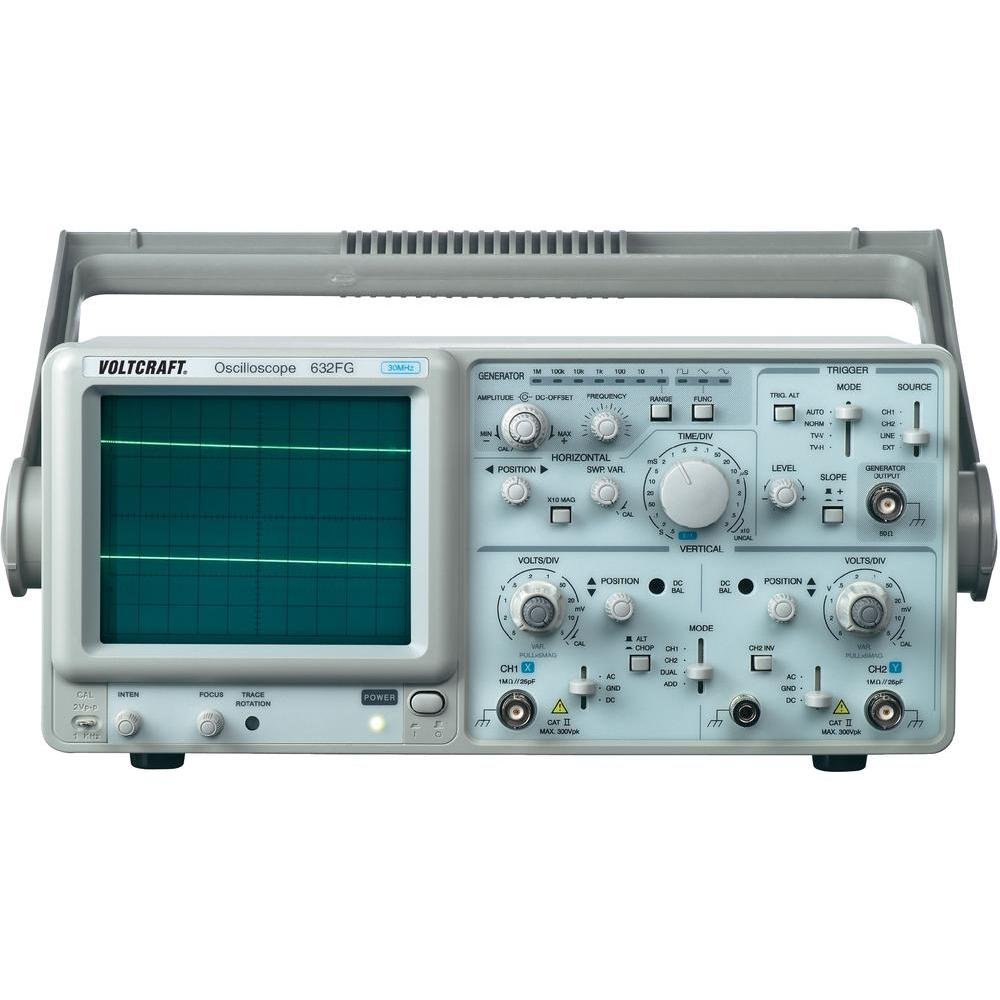
jimar 4.1: Pêşde view of the VOLTCRAFT GOS-632 FG Oscilloscope. This image shows the main display, control knobs, and input connectors for the two channels and the frequency generator output.
4.1. Control Panel Eniya
- CRT Display: Shows the waveform.
- CH1/CH2 Input: Girêdanên BNC ji bo girêdana probên osîloskopê.
- VOLTS/DIV: Adjusts the vertical sensitivity for each channel.
- REWŞ: Adjusts the vertical position of the waveform.
- TIME/DIV: Adjusts the horizontal sweep speed.
- TRIGGER LEVEL: Sets the voltage level at which the sweep starts.
- AWA: Selects trigger source (CH1, CH2, EXT, LINE).
- FREQUENCY GENERATOR OUTPUT: BNC connector for the integrated signal generator.
- FREQUENCY/AMPLITUDE: Controls for the frequency generator output.
- POWER Switch: Amûrê vedike an vedike.
4.2. Têkiliyên Panelê Rear
- Têketina Hêza AC: Connector ji bo korda hêzê.
- Termînala Erdê: For additional grounding if required.
5. Sazkirin
- Vekirin: Carefully remove the oscilloscope from its packaging. Retain the packaging for future transport.
- Cihkirin: Place the oscilloscope on a stable, level surface with adequate ventilation around the unit.
- Têkiliya Hêzê: Connect the supplied power cord to the AC power input on the rear panel and then to a grounded electrical outlet.
- Têkiliya Probe: Probên osîloskopê bi girêdanên têketina CH1 û/an CH2 BNC yên li ser panela pêşiyê ve girêdin. Girêdanek ewle misoger bikin.
- Tezmînata Sondajê: Before taking measurements, compensate your probes. Connect the probe tip to the probe compensation output (usually a square wave signal on the front panel) and adjust the probe's compensation trimmer until a flat-top square wave is displayed.
6. Bikaranîna Osîloskopê
6.1. Pîvana bingehîn
- Hêzdarkirin: Press the POWER switch to turn on the oscilloscope. Allow a few minutes for the display to stabilize.
- Nîşana Ketinê: Probê bi xala devreyê ya ku hûn dixwazin bipîvin ve girêdin.
- Vertical Adjustment (VOLTS/DIV & POSITION):
- Select the appropriate VOLTS/DIV setting to display the waveform within the screen.
- Use the POSITION knob to center the waveform vertically.
- Horizontal Adjustment (TIME/DIV & POSITION):
- Select the appropriate TIME/DIV setting to display several cycles of the waveform horizontally.
- Use the horizontal POSITION knob to move the waveform left or right.
- Trigger Setup:
- Set the TRIGGER MODE (e.g., AUTO, NORM).
- Adjust the TRIGGER LEVEL knob until a stable waveform is displayed.
- Select the TRIGGER SOURCE (e.g., CH1, CH2).
6.2. Using the Frequency Generator
- Derketina Girêdanê: Connect a BNC cable from the FREQUENCY GENERATOR OUTPUT to the circuit or device under test.
- Frequency Set: Use the FREQUENCY control to select the desired output frequency.
- Danîn Amplitude: Bi kar tînin AMPLITUDE control to adjust the output signal strength.
- Waveform Selection: If available, select the desired waveform type (e.g., sine, square, triangle).
7. Maintenance
- Paqijî: Disconnect the power cord before cleaning. Use a soft, damp cloth with a mild detergent to clean the exterior. Do not use abrasive cleaners or solvents.
- Embarkirinî: When not in use for extended periods, store the oscilloscope in a dry, dust-free environment.
- Calibration: For accurate measurements, periodic calibration by qualified personnel is recommended.
8. Destpêkirin
| Pirsegirêk | Sedema gengaz | Çare |
|---|---|---|
| No display piştî hêza li ser | No power, brightness/focus too low | Check power cord, outlet. Adjust INTENSITY and FOCUS knobs. |
| Unstable waveform | Incorrect trigger settings, signal too noisy | Adjust TRIGGER LEVEL, TRIGGER MODE, and TRIGGER SOURCE. Check signal integrity. |
| No sînyala nîşan dan | Probe not connected, incorrect VOLTS/DIV, signal outside range | Ensure probe is connected and making contact. Adjust VOLTS/DIV and POSITION. Check probe compensation. |
| Frequency generator output not working | Output cable not connected, amplitude set to zero | Check output cable connection. Increase AMPLITUDE. |
9. Specifications
| Taybetî | Hûrî |
|---|---|
| Hejmara Model | GOS-632 FG |
| Çêker | VOLTCRAFT |
| Bandwidth | 30 MHz (DC) |
| Channels | 2 Kanalên Analog |
| Integrated Function | Generator Frequency |
| Giraniya hilberê | 9.07 g (Note: This weight seems unusually low for an oscilloscope and might be a data entry error. Refer to product packaging for accurate weight.) |
| ASIN | B003IDBEYM |
| Yekem Berdest | 31ê Adarê, 2015 |
10. Garantî û Piştgirî
VOLTCRAFT products are designed for quality and reliability. For information regarding warranty terms, technical support, or service, please refer to the warranty card included with your product or visit the official VOLTCRAFT website. Do not attempt to repair the device yourself, as this may void your warranty.
For further assistance, please contact your local VOLTCRAFT distributor or customer service center.
Ask a question about this manual
Ask about setup, troubleshooting, compatibility, parts, safety, or missing instructions. Manuals+ will review the question and use this page’s manual context to help answer it.