
Pêşkêş
The Wahl Professional Super Taper II Corded Clipper is a high-performance hair cutting tool designed for versatile use. It features a powerful V5000 motor and an adjustable blade, suitable for various hair cutting needs.
Naveroka pakêtê:
- Wahl Professional Super Taper II Corded Clipper
- 8 Attachment Combs (various lengths)
- Cleaning Brush
- Blade Oil
- Telîmatên Operating
- Nobedarên Blade
- Styling Comb
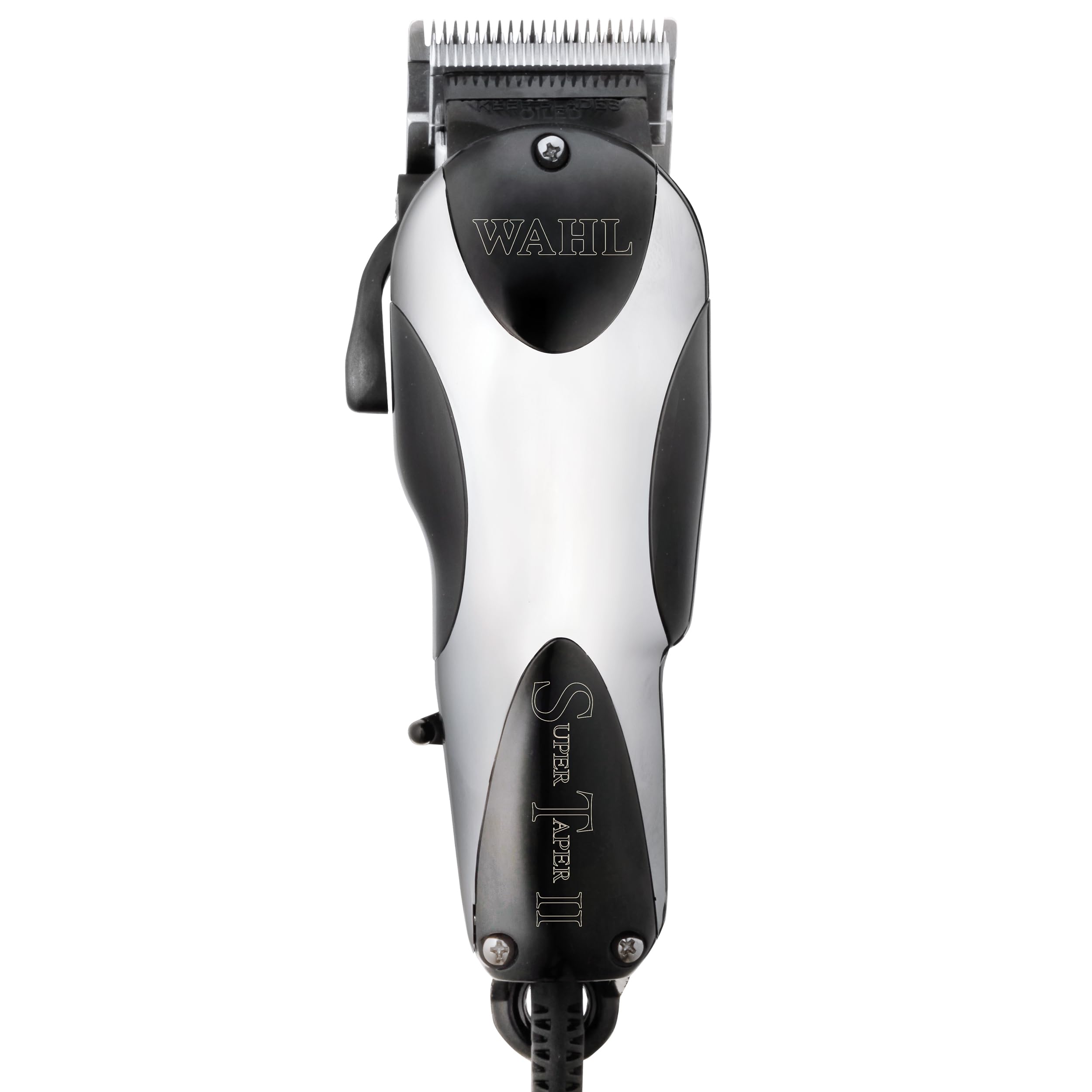
Image: Wahl Professional Super Taper II Corded Clipper, showing its silver and black design with the power cord.

Image: The Wahl Super Taper II Corded Clipper highlighting its features such as the adjustable taper lever, powerful electromagnetic V5000 motor, and suitability for tapering, fades, and blends.

Image: A visual representation of all items included in the Wahl Super Taper II Corded Clipper package, including the clipper, various colored guide combs, cleaning brush, oil, and styling comb.
Agahiyên Ewlekariya Girîng
To reduce the risk of electric shock, injury, or damage, please read all instructions before using this appliance.
- Destê xwe nedin amûra ku ketiye avê. Tavilê jê veke.
- Dema serşuştinê an di serşokê de bikar neynin.
- Amûrê li cîhê ku bikeve an jî bê kişandin nav tas û lavaboyê nehêlin û nehêlin.
- Di nav avê an şilek din de nehêlin û nehêlin.
- Her gav piştî karanîna vê amûrê tavilê ji pêveka elektrîkê derxînin.
- Berî paqijkirin, danîn an jî rakirina parçeyan vê amûrê ji fîşê vekin.
- Dema ku ev amûr ji hêla zarokan, li ser, an nêzî zarokan an kesên nevala ve tê bikar anîn, çavdêriya nêzîk hewce ye.
- Vê amûrê tenê ji bo karanîna malê ya mebesta wê ya ku di vê manualê de hatî destnîşan kirin bikar bînin.
- Pêvekên ku ji hêla çêker ve nayê pêşniyar kirin bikar neynin.
- Heke kabloyek an fîşeka wê zirarê dîtî, heke ew bi rêkûpêk ne dixebite, an jî heke ew dabeş bûbe an xesar be vê carê nexebitînin.
- Kordê ji rûvên germkirî dûr bigirin.
- Tu carî tiştek neavêjin û nexin nav tu vebûnê.
- Li cîhê ku hilberên aerosol (spray) têne bikar anîn an li cîhê ku oksîjen tê dayîn li derve bikar neynin.
- Vê amûrê bi kulmek xerabûyî an şikestî bikar neynin, ji ber ku dibe ku zirar çêbibe.
- Before storing, make sure the cord is not twisted or kinked.
Sazkirin û Bikaranîna Destpêkê
Vekirin:
Carefully remove the clipper and all accessories from the packaging. Inspect the clipper for any visible damage. Ensure all listed components are present.
Blade Adjustment (Zero-Gapping):
For closer cutting, the blades can be adjusted. This process, known as "zero-gapping," involves aligning the cutting blade closer to the bottom blade.
- Loosen the two screws on the clipper blade slightly.
- Carefully push the bottom blade closer to the cutting blade. Ensure the cutting blade does not extend beyond the bottom blade to prevent skin irritation.
- Maintain a slight, barely visible gap between the two blades.
- Hold the bottom blade firmly by its sides and carefully tighten the screws.
- Turn the clipper on for a few seconds, then off, to check blade alignment. If misaligned (e.g., the far left tooth of the cutting blade should overlap with the 2nd tooth of the bottom blade), repeat the adjustment process.
- If the blades are aligned but the clipper behaves strangely, adjust the power screw on the side of the clipper until optimal performance is achieved.
Baldaynî: A zero-gapped clipper cuts very close. Always ensure the blade is flat against the scalp to avoid nicks or cuts.
Telîmatên Operating
Çalakî / Çalakî:
Plug the clipper into a suitable electrical outlet. Use the power switch located on the side of the clipper to turn it on or off.
Bikaranîn Combs Attachment:
The clipper comes with 8 color-coded attachment combs for various cutting lengths. To attach a comb, align it with the clipper blade and push until it securely snaps into place. Ensure the comb is firmly attached before use to prevent it from detaching during a haircut.
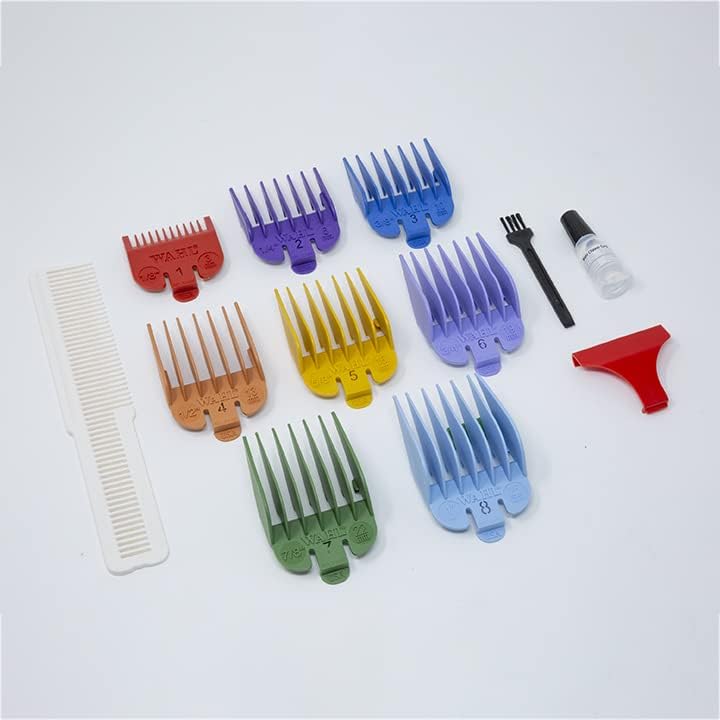
Image: A set of colorful Wahl guide combs, used to achieve different hair cutting lengths.
Levera Taperê ya Birêkûpêk:
The adjustable taper lever allows for fine-tuning cutting lengths without changing attachment combs. Moving the lever up (closed) provides a shorter cut, while moving it down (open) provides a longer cut. This feature is useful for blending and tapering.
Hair Cutting Tips:
- Always start with a longer comb length than desired and gradually reduce it.
- Cut against the direction of hair growth for an even cut.
- Use smooth, overlapping strokes.
- For self-haircuts, use multiple mirrors to ensure accuracy, especially for the back of the head.
Lênerrînî
Paqijkirina pêlavan:
After each use, turn off and unplug the clipper. Use the provided cleaning brush to remove any loose hair from the blades. Regular cleaning prevents hair buildup and ensures optimal performance.
Rûnkirina kêran:
Oiling the blades is crucial for maintaining clipper performance, reducing friction, preventing pulling and snagging, and protecting against rust. Wahl's high-carbon blades benefit significantly from regular oiling.
- Ensure the clipper is clean and free of hair.
- Apply a drop of Wahl clipper oil to each corner of the top blade.
- Apply a drop of oil to the foot of the blade (the part that moves against the stationary blade).
- Turn the clipper on for a few seconds to allow the oil to distribute evenly across the blades.
- Rûnê zêde bi qumaşê paqij paqij bikin.
Oiling is recommended after every few haircuts, or whenever the clipper feels sluggish or starts to pull hair.
Video: A demonstration on how to oil clipper blades to prevent pulling and maintain performance. This video shows the proper application of oil to the blades and how to distribute it.
Embarkirinî:
When not in use, store the clipper unplugged, away from moisture, and with the blade guard in place to protect the blades.
Çareserkirina pirsgirêkan
| Pirsegirêk | Sedema gengaz | Çare |
|---|---|---|
| Clipper pulls hair or cuts unevenly | Blades are dull, not oiled, or misaligned. | Clean and oil blades. Check blade alignment and adjust if necessary (refer to "Blade Adjustment" section). If blades are dull, consider replacement. |
| Clipper makes unusual noise or vibrates excessively | Blades need oiling or power screw adjustment. | Oil the blades. Adjust the power screw on the side of the clipper until the noise subsides and operation is smooth. |
| Attachment comb detaches during use | Comb not securely attached or excessive force used. | Ensure the comb snaps firmly into place before use. Avoid using excessive force or rough handling during cutting. |
| Clipper overheats quickly | Prolonged use or lack of lubrication. | Allow the clipper to cool down. Ensure blades are properly oiled to reduce friction. Avoid continuous operation for extended periods. |
Specifications
- Hejmara Model: 84701
- Nîşan: Wahl Professional
- Çavkaniya hêzê: Corded Electric
- Motor: V5000 Electromagnetic Motor
- Tîpa pêlê: Adjustable High-Carbon Steel Blades
- Reng: Zîv & Reş
- Giraniya Babetê: 1 Pound
- Mezinahiyên hilberê: 12 x 4 x 6 inches
- GTIN (UPC): 043917847016
Garantî û Piştgirî
Agahiya Garantiyê:
The Wahl Professional Super Taper II Corded Clipper comes with a one-year limited warranty from the date of purchase. This warranty covers defects in materials and workmanship under normal use. Please retain your proof of purchase for warranty claims.
Piştgiriya Xerîdar:
For technical assistance, troubleshooting, or warranty service, please contact Wahl Professional customer service. Contact details can typically be found on the Wahl Professional webmalper an jî di pakêta hilberê ya orîjînal de.
Vîdyo: Serkeftinekview of the Wahl Professional Super Taper II Hair Clipper, model 8470-500, highlighting its ultra-powerful full-size design and V5000 motor.